| Environment | Method | Endpoint |
|---|---|---|
| Sandbox | post | https://authsandbox.braspag.com.br/oauth2/token |
| Production | post | https://auth.braspag.com.br/oauth2/token |
Antifraude uses the market-standard OAuth 2.0 protocol to authorize access to its specific resources by environment, Sandbox and Production.
If you use Antifraude integrated with the Gateway de Pagamento, you do not need to follow the authentication step.
How to obtain the access token
During onboarding, you will receive the ClientId and ClientSecret credentials. If you have not received the credential, request it from support
1. Concatenate the credentials in the format ClientId:ClientSecret;
2. Convert the result to base64, generating a string;
Example:
- client_id: braspagtestes
- client_secret: 1q2w3e4r5t6y7u8i9o0p0q9w8e7r6t5y4u3i2o1p
- String to be Base64-encoded: braspagtestes:1q2w3e4r5t6y7u8i9o0p0q9w8e7r6t5y4u3i2o1p
- Result after encoding: YnJhc3BhZ3Rlc3RlczoxcTJ3M2U0cjV0Nnk3dThpOW8wcDBxOXc4ZTdyNnQ1eTR1M2kybzFw
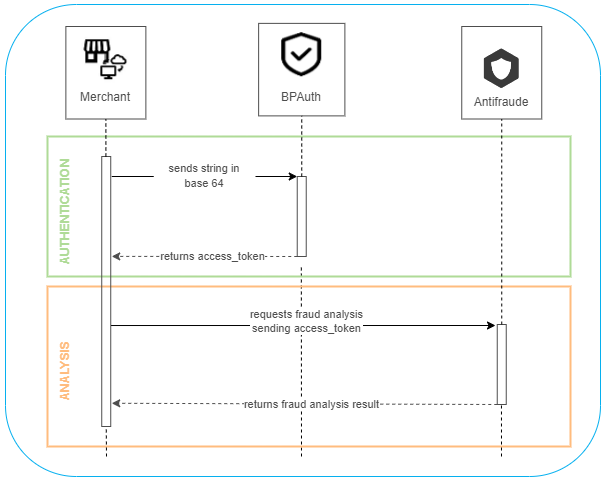
3. Send the base64 string in the Authentication request (POST);
4. The Authentication API will validate the string and return the access_token.
Theaccess_tokenis valid for 20 minutes, and a new token must be generated every time it expires.You must send the access token returned by the authentication API (
access_token) in every request to the Antifraude API.
See the diagram below for the authentication scheme and how to send the access_token in the fraud analysis request.