

General structure of codes returned by the Gateway de Pagamento
The Gateway de Pagamento uses a multiple return code structure to provide a detailed result for each request. It's essential to understand that success in HTTP communication (2xx code) does not guarantee the success of the transaction (authorization, capture, etc.). You must also check the codes in the response body.
The flowchart below illustrates the API's general return structure, showing the difference between technical success (HTTP) and the operation's result:
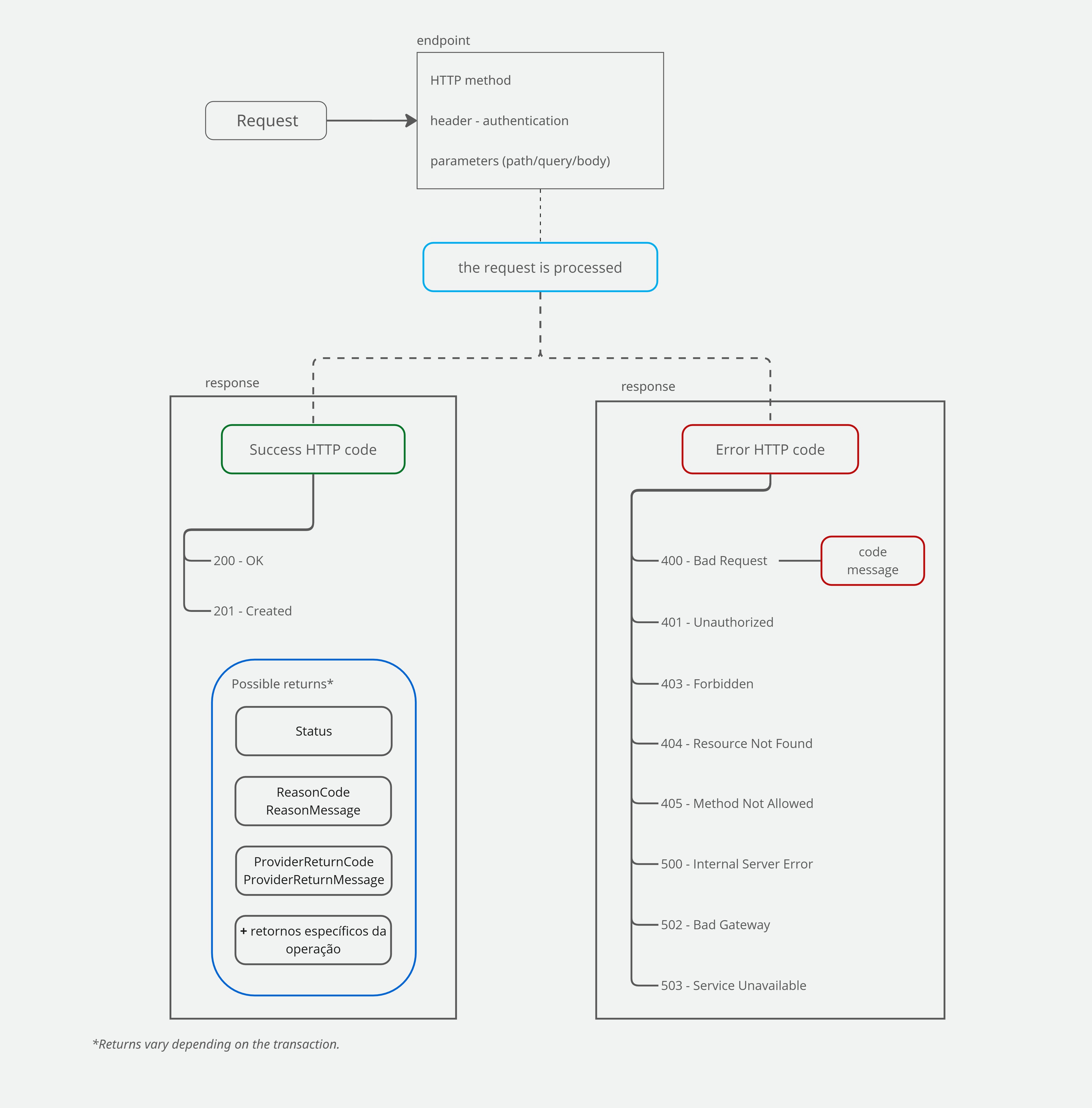
If you're just starting out, use this table as your main guide and check the specific sections linked at the end of the page for more details:
Summary of Gateway de Pagamento codes
The following table presents a general summary of the codes returned by the Gateway de Pagamento:
| Code type | Where it's returned (parameter) | When it's returned | Examples | Note |
|---|---|---|---|---|
| HTTP Status | Response header | Returned on every response to a request made to the API | 200 – OK 201 – Created 401 – Unauthorized | 4xx/5xx indicate a failure in the request or server (the API received the call, but couldn't process it); check the Code and Message when present.200 and 201 returns mean the Gateway received the request and gave a response, but you must check ProviderReturnCode and ProviderReturnMessage to know whether it's a positive response. |
| API errors | Code andMessage | Returned when there is an HTTP error | Providing an invalid MerchantKey will return HTTP code 400 and Code = 123 with Message equal to "MerchantKey is invalid". | May be the same values returned in ProviderReturnCode and ProviderReturnMessage or ReasonCode and ReasonMessage |
| Transaction status | Payment.Status | In operations related to creating and/or querying transactions (after the transaction has been created, that is, it must have received a 201 created). - Transaction creation - Transaction query - Transaction void | Payment.Status = 2 indicates that the payment has been confirmed. | -- |
| Provider (acquirer) return code | ProviderReturnCode and ProviderReturnMessage | In any operation*, when there is a successful HTTP response. Represents the return from the provider/acquirer configured in the Gateway (e.g., Cielo, Pix, Currency Converter). - Transaction creation - Void - Capture | Success example: ProviderReturnCode = 00 and ProviderReturnMessage = Transacao autorizada Error example: ProviderReturnCode = 51 and ProviderReturnMessage = Autorizacao negada | Even when the HTTP return is successful (200 or 201), another error or pending status may still have occurred, which must be checked via ProviderReturnCode and ProviderReturnMessage. Warning: the specific codes documented here only apply when the provider/acquirer is Cielo. If the merchant uses another acquirer, check that acquirer's documentation for the corresponding code list. |
| Return reason codes | ReasonCode and ReasonMessage | -Capture; -Void; -Currency conversion; -Boleto payment creation. | Success example: ReasonCode = 0 and ReasonMessage = Operation SuccessfulError example: ReasonCode = 7 and ReasonMessage = Denied | Even when the HTTP return is successful (200 or 201), another error or pending status may still have occurred, which must be checked via ReasonCode and ReasonMessage |
*The query operation typically does not return ProviderReturnCode or ReasonCode and their respective messages.
The API can also return codes related to specific operations and features, such as capture, void, Pix transactions, recurring payments, or fraud analysis.
Example of a response for an authorized credit card transaction
In the credit card transaction response, the API returns all parameters sent in the request as well as parameters exclusive to the response, such as:
- Parameters related to transaction reconciliation, such as
Tid,SentOrderId, andProofOfSale; - Transaction status, in the
Payment.Statusparameter; Payment.ProviderReturnCodeandPayment.ProviderReturnMessage, which represent the returns from the authorization flow with the provider/acquirer and indicate whether the transaction was successful or not;Links, which indicate which operations can still be performed for this transaction, such as capture, query, and void.
{
  "MerchantOrderId": "2017051001",
  "Customer": {
    "Name": "Aline de Souza",
    "Identity": "12345678909",
    "IdentityType": "CPF",
    "Email": "[email protected]",
    "Birthdate": "1990-01-01",
    "IpAddress": "127.0.0.1"
  },
  "Payment": {
    "ServiceTaxAmount": 0,
    "Installments": 1,
    "Interest": "ByMerchant",
    "Capture": true,
    "Authenticate": true,
    "Recurrent": false,
    "CreditCard": {
      "CardNumber": "409168******7641",
      "Holder": "Aline de Souza",
      "ExpirationDate": "12/2035",
      "SaveCard": false,
      "Alias": "",
      "Brand": "Visa",
      "PaymentAccountReference": "DJL4R99SL2GQANTW0Q4FKCVWSI24W"
    },
    "ProofOfSale": "473618",
    "AcquirerTransactionId": "0722040850557",
    "AuthorizationCode": "997634",
    "SoftDescriptor": "LojaTeste",
    "SentOrderId": "2025072216085029F401",
    "Eci": "5",
    "ExternalAuthentication": {
      "Cavv": "AAABB2gHA1B5EFNjWQcDAAAAAAB=",
      "Xid": "Uk5ZanBHcWw2RjRCbEN5dGtiMTB=",
      "Eci": "5",
      "Version": "2.2.0",
      "ReferenceId": "a24a5d87-b1a1-4aef-a37b-2f30b91274e6"
    },
    "Credentials": {
      "Code": "9999999",
      "Key": "D8888888",
      "Password": "LOJA9999999",
      "Signature": "001",
      "Username": "#Braspag2018@NOMEDALOJA#"
    },
    "DoSplit": false,
    "Tip": false,
    "PaymentId": "d08a3e92-56d8-497c-a64a-a79819066fce",
    "Type": "CreditCard",
    "Amount": 10000,
    "ReceivedDate": "2025-07-22 16:08:50",
    "CapturedAmount": 10000,
    "CapturedDate": "2025-07-22 16:08:50",
    "Currency": "BRL",
    "Country": "BRA",
    "Provider": "Simulado",
    "ExtraDataCollection": [
      {
        "Name": "NomeDoCampo",
        "Value": "ValorDoCampo"
      }
    ],
    "ReasonCode": 0,
    "ReasonMessage": "Successful",
    "Status": 2,
    "ProviderReturnCode": "6",
    "ProviderReturnMessage": "Operation Successful",
    "Links": [
      {
        "Method": "GET",
        "Rel": "self",
        "Href": "https://apiquerysandbox.braspag.com.br/v2/sales/d08a3e92-56d8-497c-a64a-a79819066fce"
      },
      {
        "Method": "PUT",
        "Rel": "void",
        "Href": "https://apisandbox.braspag.com.br/v2/sales/d08a3e92-56d8-497c-a64a-a79819066fce/void"
      }
    ]
  }
}
Next sections
Understand the HTTP codes returned by the API and what they actually indicate about the success or failure of communication with Cielo.
Learn about the transactional statuses that represent a payment's lifecycle, from creation to payment confirmation, void, or refund.
Check the business return codes used to identify success, denial, or pending status in payment operations in the ProviderReturnCode and ProviderReturnMessage fields. The listed codes are specific to Cielo as the acquirer; for other acquirers, check the corresponding documentation.
Learn how to identify and handle technical API errors returned in error HTTP responses, in the Code and Message fields.
Check the card brand return codes standardized by Abecs, and learn how to interpret them in API responses.
Understand when it's allowed to resend a denied card transaction and how the retry programs defined by the card brands work.