

To receive notifications about transaction status changes, such as payment confirmation or refund, configure a notification URL in the E-commerce Portal.
The URL configuration can be done directly by the merchant in the Production and Sandbox environments.
To learn how to configure the notification URL, see How to configure URL (Webhook)?.
The address must use HTTPS and the standard port 443.
See the flow followed by the notification post:
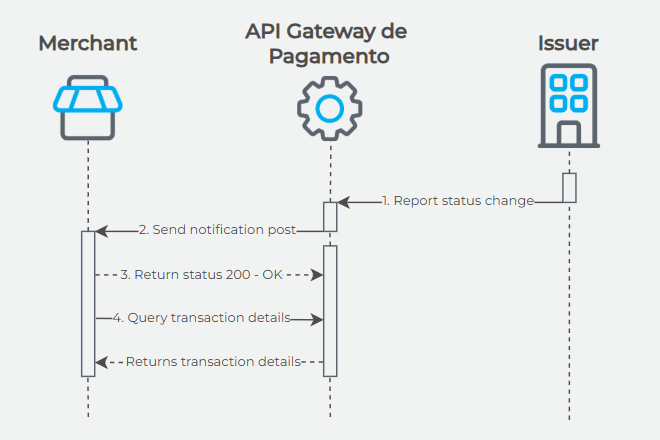
WarningAs there is a possibility of intermittence between the client and server APIs, it is necessary to track pending (unpaid) transactions that have not yet been updated on the current day.
Sent Notification
{
   "RecurrentPaymentId": "xxxxxxxx-xxxx-xxxx-xxxx-xxxxxxxxxxxx",
   "PaymentId": "xxxxxxxx-xxxx-xxxx-xxxx-xxxxxxxxxxxx",
   "ChangeType": 2
}| Property | Description | Type | Size | Required? |
|---|---|---|---|---|
RecurrentPaymentId | Identifier representing the recurring order (only applicable for ChangeType 2 or 4). | GUID | 36 | No |
PaymentId | Identifier representing the transaction. | GUID | 36 | Yes |
ChangeType | Specifies the notification type. Note: See table below. | Number | 1 | Yes |
| ChangeType | Description |
|---|---|
| 1 | Payment status change. |
| 2 | Recurrence created. |
| 3 | Anti-fraud status change. |
| 4 | Recurring payment status change (e.g.: automatic deactivation). |
| 5 | Refund denied (applicable to Rede). |
| 6 | Underpaid registered boleto. |
| 7 | Chargeback notification. Exclusive for merchants integrated to Risk Notification (deprecated). |
| 8 | Fraud alert. |
| 25 | Transaction canceled or partially refunded. |
Risk Notification API is being deprecated. The new Cielo service for querying, accepting and disputing a chargeback is Chargeback API.
Expected Response
The expected response from the store is: HTTP Status Code 200 OK.
If the above response is not returned, there will be two more attempts to send the Notification Post.