

General structure of codes returned by API E-commerce
The API E-commerce uses a multi-code response structure to provide detailed results for each request. It is important to understand that successful HTTP communication (2xx status code) does not guarantee a successful transaction (authorization, capture, and so on). You must also verify the codes returned in the response body.
The following flowchart illustrates the API's overall response structure, highlighting the difference between technical success (HTTP) and the operation result:
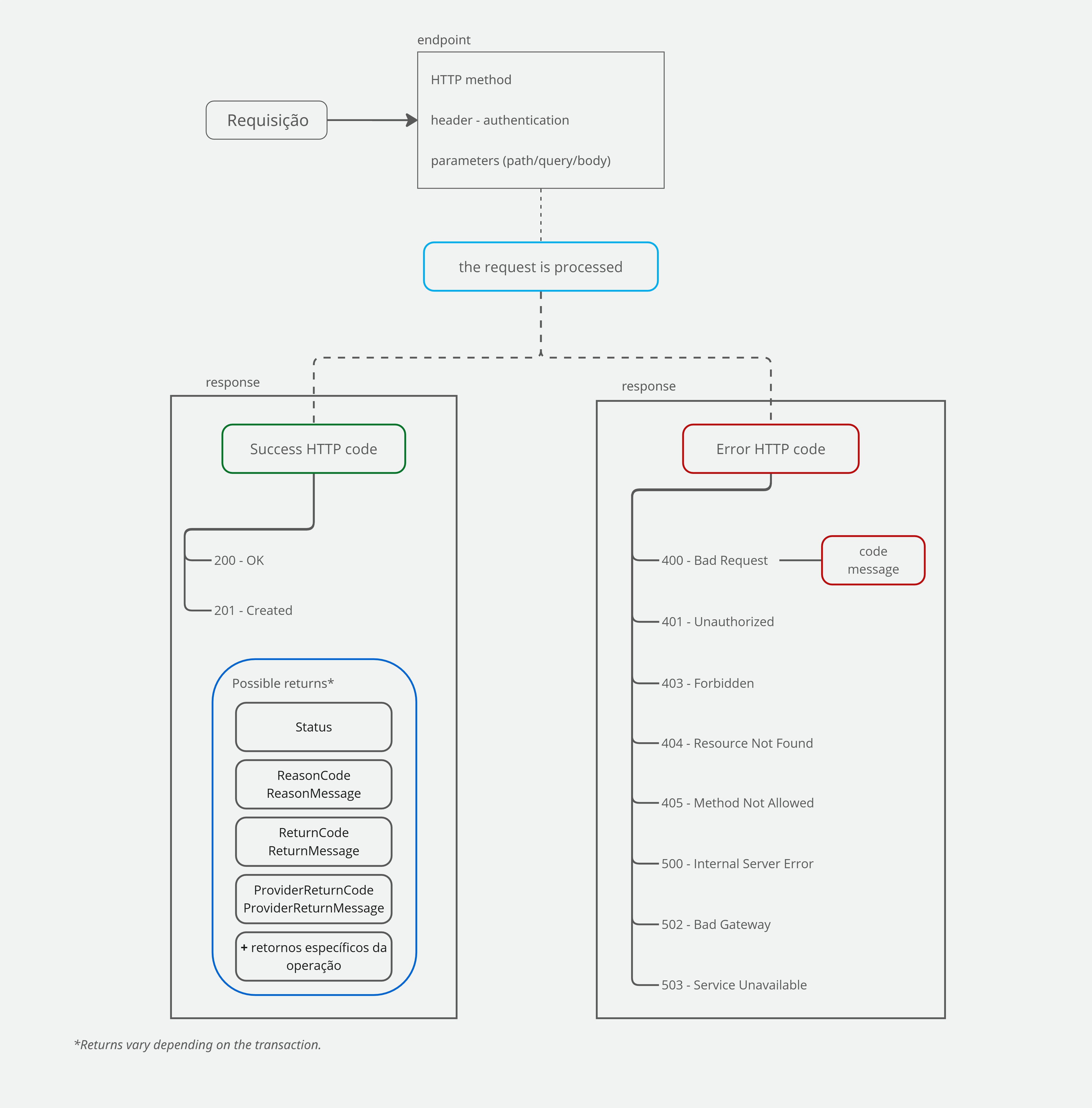
If you're just getting started, use this table as your primary guide. For more details, see the specific sections linked at the end of this page:
Response code summary for API E-commerce
The following table provides a general overview of the codes returned by the API E-commerce:
| Code type | Returned in (parameter) | Returned when | Examples | Notes |
|---|---|---|---|---|
| Status HTTP | Response header | Returned in every response to a request made to the API. | 200 – OK 201 – Created 401 – Unauthorized | 4xx/5xx HTTP status codes indicate a request or server failure (the API received the request but could not process it). Check HTTP 200 and 201 responses mean that the API E-commerce Cielo received the request and returned a response. However, you must verify |
| Erros da API | Code andMessage | Returned when an HTTP error occurs | Providing an invalid MerchantKey returns HTTP status code 400, with Code set to 123 and Message set to "MerchantKey is invalid". | They may be the same values returned in ReturnCode and ReturnMessage, or in ReasonCode and ReasonMessage. |
| Status da transação | Payment.Status | For operations related to creating and/or querying transactions (after the transaction has been created, meaning a 201 Created response must have been returned).
| Payment.Status = 2 indicates that the payment has been confirmed. | -- |
| Código de retorno das vendas | ReturnCode and ReturnMessage | In any operation*, when the HTTP response indicates success. For transaction creation operations, an ABECS code may be returned.
| Success example: Error example: | Even when the HTTP response indicates success (200 or 201), an error or pending status may still have occurred. You must verify ReturnCode and ReturnMessage to determine the actual outcome of the operation. |
| Código de retorno do provedor de pagamento | ProviderReturnCode and ProviderReturnMessage | For operations that involve a provider, such as Pix and Currency Conversion, or for capture operations, where it represents the response from Cielo's authorizer.
| ProviderReturnCode = 0 and ProviderReturnMessage = Refund requested successfully (Pix refund) | Even when the HTTP response indicates success (200 or 201), an error or pending status may still have occurred. You must verify ProviderReturnCode and ProviderReturnMessage to determine the actual outcome of the operation. |
| Códigos de motivo do retorno | ReasonCode and ReasonMessage |
| Success example: Error example: | Even when the HTTP response indicates success (200 or 201), an error or pending status may still have occurred. You must verify ReasonCode and ReasonMessage to determine the actual outcome of the operation. |
*Query operations typically do not return ReturnCode or ReasonCode , nor their corresponding messages.
The API may also return codes related to specific operations and features, such as capture, void, Pix transactions, recurring transactions, or fraud analysis.
Example response for an authorized credit card transaction
The API E-commerce Cielo returns in the credit card transaction response all parameters sent in the request, as well as response-specific parameters, such as:
- Transaction reconciliation parameters, including
Tid,SentOrderId, andProofOfSale; - The transaction status, in the
Payment.Statusparameter; Payment.ReturnCodeandPayment.ReturnMessage, which represent the authorization flow responses and indicate whether the transaction was successful;Links, which indicate what operations can still be performed on the transaction, such as capture, query, and void.
{
  "MerchantOrderId": "Pedido123456",
  "Customer": {
    "Name": "Buyer",
    "Identity": "11122233344",
  },
  "Payment": {
    "Installments": 1,
    "Capture": false,
    "CreditCard": {
      "CardNumber": "123412******1234",
      "Holder": "Test Buyer",
      "ExpirationDate": "12/2030",
      "SaveCard": false,
      "Brand": "Visa",
      "PaymentAccountReference": "ENCIVBXH61S4EIC6IKMAQHD30FE8X"
    },
    "Tid": "1104045449792",
    "ProofOfSale": "755991",
    "AuthorizationCode": "274780",
    "SentOrderId": "Pedido123456",
    "Amount": 10000,
    "ReceivedDate": "2025-11-04 16:54:49",
    "Status": 1,
    "ReturnMessage": "Operation Successful",
    "ReturnCode": "4",
    "PaymentId": "5f675bb7-8091-490e-b7d4-8d83a46fddd2",
    "Type": "CreditCard",
    "Currency": "BRL",
    "Country": "BRA",
    "Links": [
      {
        "Method": "GET",
        "Rel": "self",
        "Href": "https://apiquerysandbox.cieloecommerce.cielo.com.br/1/sales/5f675bb7-8091-490e-b7d4-8d83a46fddd2"
      },
      {
        "Method": "PUT",
        "Rel": "capture",
        "Href": "https://apisandbox.cieloecommerce.cielo.com.br/1/sales/5f675bb7-8091-490e-b7d4-8d83a46fddd2/capture"
      },
      {
        "Method": "PUT",
        "Rel": "void",
        "Href": "https://apisandbox.cieloecommerce.cielo.com.br/1/sales/5f675bb7-8091-490e-b7d4-8d83a46fddd2/void"
      }
    ]
  }
}