

Fingerprint configuration for Cybersource analysis
What is Fingerprint?
Fingerprint is the digital identification of the shopper's device. This identification is made up of a series of data collected on the checkout page of the site or app, such as:
- IP of the shopper's device;
- Browser version;
- Operating system;
- Language and country compatibility.
Fingerprint identifies the device used per browsing session and persists for approximately 24 hours. If the page is closed and the shopper returns to the site by opening a new page, or if the app is closed and reopened, you must generate a new session and a new session identification.
Fingerprint is important for fraud analysis because, often, cart data alone is not enough to guarantee an accurate analysis. The data collected by Fingerprint complements the analysis and increases your merchant's security.
WarningTo meet the requirements of the General Data Protection Law (LGPD), include information about collecting the shopper's device data in your e-commerce's cookie policy.
Who creates the Fingerprint?
For analyses via Cybersource, the Fingerprint is created before the fraud analysis request by Threatmetrix, the company that performs device identification.
To establish communication between your checkout page and Threatmetrix and send the shopper's data, you need to insert a Fingerprint code into your e-commerce; read more about this in How to configure Fingerprint on Cybersource?
Fingerprint flow with Cybersource
Fingerprint creation happens separately from the fraud analysis request.
See the representation of the Fingerprint creation flow and fraud analysis request:
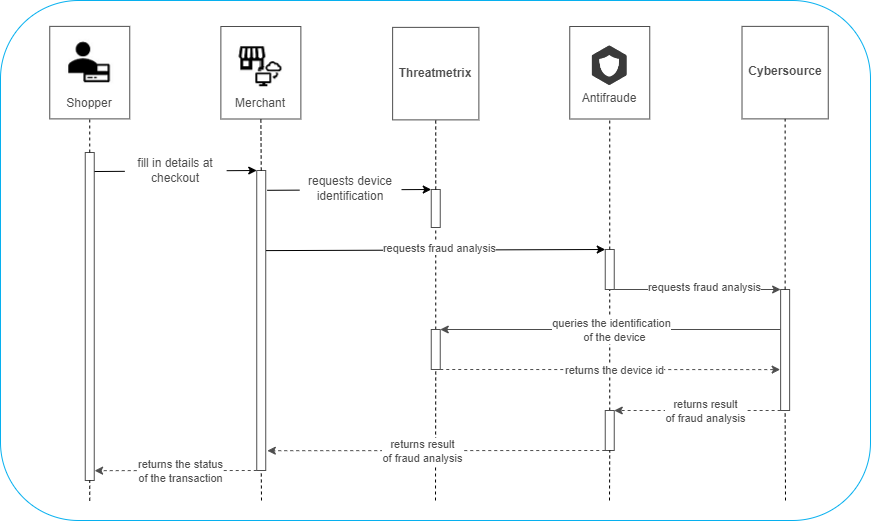
Fingerprint creation step
- The shopper fills in the data requested on the merchant's checkout page (website or app);
- The merchant's checkout page, already configured with the Fingerprint code, collects the shopper's data and sends it to Threatmetrix requesting device identification (Fingerprint creation);
- Threatmetrix creates the Fingerprint of the shopper's device.
Fraud analysis step
- The merchant sends the fraud analysis request with the
Customer.BrowserFingerprintfield to Antifraude; - Antifraude validates the request and requests fraud analysis from Cybersource;
- Cybersource queries the Fingerprint in Threatmetrix, performs the fraud analysis, and sends the recommendation (Accept/Reject/Review) to Antifraude;
- Antifraude returns the fraud analysis result to the merchant;
- The merchant returns the transaction status (approved or not approved) to the shopper.
Where to send the Fingerprint?
In the fraud analysis request with Cybersource, the value of the Customer.BrowserFingerprint parameter will be the ProviderIdentifier generated by the merchant.
Note that the value of Customer.BrowserFingerprint is not the Fingerprint itself, but rather an indication of the transaction's Fingerprint (ProviderIdentifier). This indication will be used by Cybersource to query the Fingerprint in the device identification service (Threatmetrix) and thus use it to compose the fraud analysis.
Warning:
The field for sending the Fingerprint identifier is different when the fraud analysis is part of the transaction request, that is, for clients integrated with the Gateway de Pagamento, API E-commerce Cielo, or Split de Pagamento. Check the
ProviderIdentifiersending field for each situation:
- Cybersource fraud analysis using the Gateway de Pagamento send the
ProviderIdentifierin thePayment.FraudAnalisys.FingerPrintIdparameter;- Cybersource fraud analysis using the API E-commerce Cielo : send the
ProviderIdentifierin thePayment.FraudAnalysis.Browser.BrowserFingerprintparameter;- Cybersource fraud analysis for clients on Split de Pagamento via Gateway de Pagamento: send the
ProviderIdentifierin thePayment.FraudAnalisys.FingerPrintIdparameter;- Cybersource fraud analysis for clients on Split via API E-commerce Cielo: send the
ProviderIdentifierin thePayment.FraudAnalysis.Browser.BrowserFingerprintparameter.
How to configure Fingerprint on Cybersource?
Fingerprint consists of implementing a script on your checkout page (front-end), in the section where the shopper fills in registration data.
Fingerprint configuration will differ for each type of client application (web, Android, or iOS), but the variables used are the same; see the table below with the Fingerprint variables.
Fingerprint variables
The following table presents the variables for configuring Fingerprint with Threatmetrix and Cybersource.
| VARIABLE | DESCRIPTION | VALUE | FORMAT | SIZE |
|---|---|---|---|---|
org_id | Indicates the environment in Threatmetrix: Sandbox or Production. | Sandbox = 1snn5n9w Production = k8vif92e | String | 08 |
ProviderMerchantId | Identifier of your merchant or operation, provided by Braspag, in the format braspag_merchantname. Different from MerchantId. | Provided by Braspag after contracting. | String | 30 |
ProviderIdentifier | Variable that you must generate to identify the session. We recommend using a GUID. This is the value that will be sent in the Customer.BrowserFingerprint field. | Custom | GUID or String, in which integers and upper- or lower-case letters are accepted. | 88 |
session_id (for web) | Concatenation of the ProviderMerchantId and ProviderIdentifier variables. The session_id value will make up the Threatmetrix URL that will be sent in the script of the web integration. | Custom | ProviderMerchantIdProviderIdentifier | 118 |
MyVariable (for mobile) | Concatenation of the ProviderMerchantId and ProviderIdentifier variables. See more details in 6. Create the session identification variable | Custom | ProviderMerchantIdProviderIdentifier | 118 |
Updated 2 months ago