

Fingerprint web
You must insert a JavaScript script into the front-end code of your checkout page.
1. Fill in the Threatmetrix URL
The Threatmetrix URL will be inserted into the script and must therefore be filled in correctly.
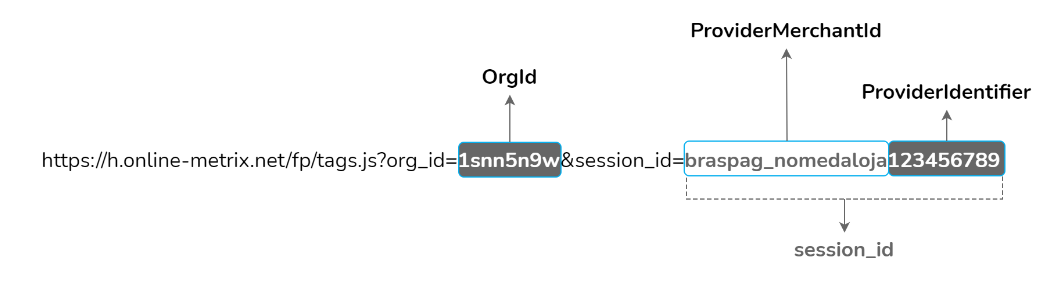
The Threatmetrix URL model is https://h.online-metrix.net/fp/tags.js?org_id=OrgId&session_id=ProviderMerchantIdProviderIdentifier
In the URL, replace the values OrgId, ProviderMerchantId, and ProviderIdentifier according to the guidance in the Threatmetrix URL Variables table.
2. Add tags to the script
Insert the URL filled in step 1 into the script and noscript tags of the JavaScript model.
The JavaScript model is shown below:
<!-- HEAD -->
<head>
    <script type="text/javascript" src="https://h.online-metrix.net/fp/tags.js?org_id=ProviderOrgId&session_id=ProviderMerchantIdProviderIdentifier"></script>
</head>

<!-- BODY -->
<body>
    <noscript>
        <iframe style="width: 100px; height: 100px; border: 0; position:absolute; top: -5000px;" src="https://h.online-metrix.net/fp/tags?org_id=ProviderOrgId&session_id=ProviderMerchantIdProviderIdentifier"></iframe>
    </noscript>
</body>- Insert the
scripttag inside theheadtag for correct performance:
<head>
<script type="text/javascript" src="https://h.online-metrix.net/fp/tags.js?org_id=ProviderOrgId&session_id=ProviderMerchantIdProviderIdentifier"></script>
</head>- Insert the
noscripttag inside thebodytag, so that device data collection is performed even if the browser's JavaScript is disabled. Thenoscripttag is a redundancy to help with data collection.
<body>
<noscript>
<iframe style="width: 100px; height: 100px; border: 0; position:absolute; top: -5000px;" src="https://h.online-metrix.net/fp/tags?org_id=ProviderOrgId&session_id=ProviderMerchantIdProviderIdentifier"></iframe>
</noscript>
</body>3. Apply the JavaScript model
Insert the JavaScript with the tags (step 2) into the front-end code of your checkout page.
You must place the code in checkout, in the registration data fill-in section. This way, the data that makes up the Fingerprint will be collected while the shopper fills in the form.
In the fraud analysis request, send only the
ProviderIdentifiervalue in theCustomer.BrowserFingerprintfield.
Updated 2 months ago