

Fraud analysis flows
Antifraude forwards a transaction's data for analysis by a fraud analysis provider. Providers use technologies such as device fingerprinting, IP geolocation, social network analysis, proxy detection, and repetition counters. Cielo receives a recommendation from the provider in real time and can then take action based on the fraud risk identified by the analysis.
The order between fraud analysis and transaction authorization directly impacts the analysis cost, checkout friction, and the visibility the provider has over your merchant's transactions. Choose the flow considering your e-commerce's risk profile and business rules.
There are two possible flows for fraud analysis:
- Fraud analysis first (AnalyzeFirst): all transactions are first submitted to Antifraude analysis and, if accepted, proceed to the acquirer's authorization process.
- Authorization first (AuthorizeFirst): all transactions are first submitted to authorization at the acquirer and, if authorized, are sent to Antifraude analysis.
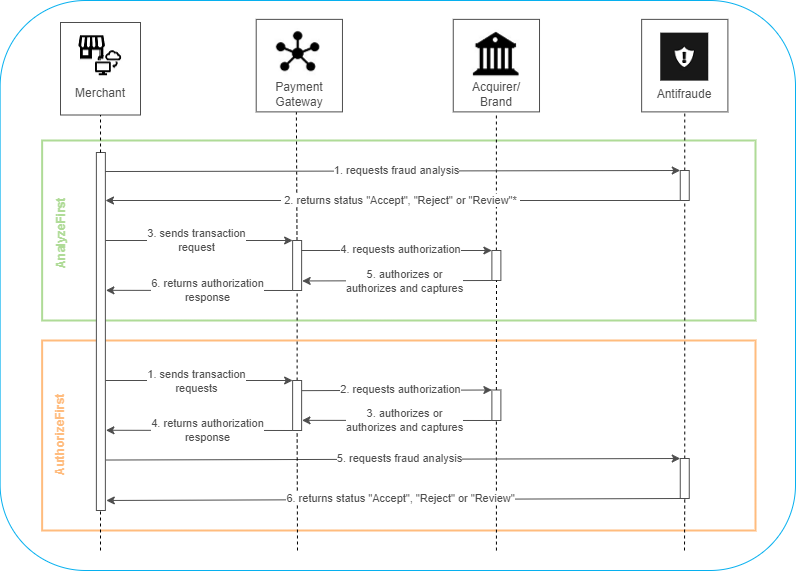
*The Review status is only returned if it's included in your plan.
Fraud analysis first (AnalyzeFirst)
- The merchant requests fraud analysis from Antifraude;
- Antifraude returns the Accept, Reject, or Review status;
- The merchant sends the transaction request to the Gateway de Pagamento;
- The Gateway de Pagamento requests authorization from the acquirer;
- The acquirer authorizes the transaction or authorizes and captures it;
- The Gateway de Pagamento returns the authorization response.
Authorization first (AuthorizeFirst)
- The merchant sends the transaction request to the Gateway de Pagamento;
- The Gateway de Pagamento requests authorization from the acquirer;
- The acquirer authorizes the transaction;
- The Gateway de Pagamento returns the authorization response;
- The merchant requests fraud analysis from Antifraude;
- Antifraude returns the Accept, Reject, or Review status.
The chosen flow must be determined during integration, as it is part of the application's architecture.
If you want to change the fraud analysis flow after integration, contact support.
Antifraude integrated with Gateway de Pagamento or API E-commerce CieloIf you use Antifraude integrated with the Gateway de Pagamento or the API E-commerce Cielo, the flow configuration (parameters
FraudAnalysis.Sequence,FraudAnalysis.SequenceCriteria,FraudAnalysis.VoidOnHighRisk, andFraudAnalysis.CaptureOnLowRisk) is done in the payment request of these products itself.See the Gateway de Pagamento documentation or the API E-commerce Cielo documentation for the full table of parameter combinations.
AuthorizeFirst x AnalyseFirst
See below the risk analysis behavior according to each integration type:
| Integration Type | Description | Required Parameters |
|---|---|---|
| Authorization first | The transaction is sent for authorization and then analyzed by Antifraude. |
|
| Analysis first | The transaction is analyzed by Antifraude and then sent for authorization. This way, high-risk transactions are prevented from being sent for authorization. |
|
| Analysis of authorized transactions | Antifraude is triggered only to analyze authorized transactions, avoiding the cost of analyzing transactions that would not receive authorization. |
|
| Analysis under any circumstance | Antifraude is triggered regardless of the transaction status after authorization. |
|
| Authorization under any circumstance | The transaction will be sent for authorization regardless of its fraud score. |
|
| Authorization only for safe transactions | The transaction proceeds to authorization only if Antifraude recommends acceptance. |
|
| Capture of safe transactions | After fraud analysis, capture will be performed automatically for authorized transactions classified as low risk. For merchants that use manual review, the transaction will be captured automatically as soon as the status is updated to "Accept". |
|
| Void of compromised transactions | If fraud analysis identifies high risk in a transaction that has already been authorized or captured, it will be immediately voided or refunded. For merchants that use manual review, the transaction will be voided or refunded automatically as soon as the status is updated to "Reject". |
|
If not specified during authorization, Braspag will process your transaction using the following flow:
FraudAnalysis.Sequenceequal to "AuthorizeFirst",FraudAnalysis.SequenceCriteriaequal to "OnSuccess",FraudAnalysis.VoidOnHighRiskequal to "false",FraudAnalysis.CaptureOnLowRiskequal to "false".
Which flow is recommended for my e-commerce?
- The choice can be made according to your business rules, taking into account aspects such as the average ticket and type of product sold;
- You can build your application with both flows and apply business rules according to your risk criteria.
See below some characteristics of each flow, which may help you decide on the best model for your business:
Fraud analysis first
- Antifraude will have visibility into the e-commerce's credit card transactions;
- Prevents early sensitization of the credit card limit, avoiding friction/poor consumer experience;
- Favors the learning of the Antifraude engine;
- There is an analysis cost when the credit card used in the transaction has no available limit.
Authorization first
- Avoids the analysis cost for credit card transactions with no available limit;
- Antifraude has no visibility into unauthorized transactions.
Next steps
- Set up Standalone Antifraude authentication;
- Set up Fingerprint for the chosen provider: Cybersource, ClearSale, or ACI Worldwide;
- Set up the Notification Post to track status changes;
- If you use the AuthorizeFirst flow, see how to associate the transaction from the Gateway de Pagamento with the Antifraude analysis.
Updated 2 months ago