

Fingerprint with ClearSale
Fingerprint is the digital identification of the shopper's device. This identification is made up of a series of data collected on the checkout page of the site or app, such as:
- Precise location (when permission is enabled by the user);
- Device advertising identifiers (when permission is enabled by the user);
- Physical device characteristics (screen, battery, keyboard, free disk space, model, device name);
- Software characteristics (version, language, build, parental controls);
- Network information (connections, IP);
- SimCard carrier.
ImportantTo meet the requirements of the General Data Protection Law (LGPD), include information about collecting the shopper's device data in your e-commerce's cookie policy.
Fingerprint flow with ClearSale
For analyses via ClearSale, the Fingerprint is created before the fraud analysis request through a JavaScript script.
Fingerprint creation happens separately from the fraud analysis request.
See the representation of the Fingerprint creation flow and fraud analysis request:
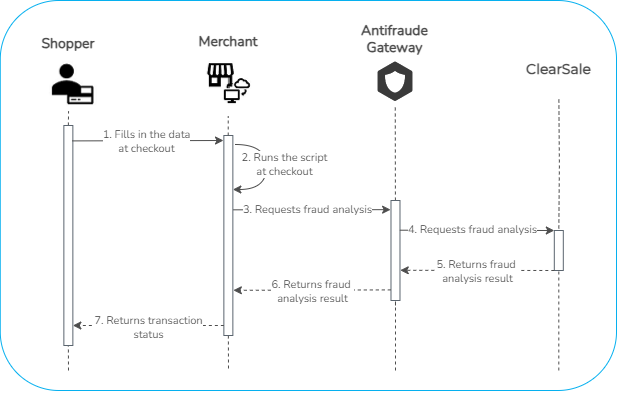
Fingerprint creation step
1. The shopper fills in the data requested on the merchant's checkout page (website or app);
2. The merchant's checkout page, already configured with the Fingerprint code, collects the shopper's data and runs the device identification script (Fingerprint creation).
Fraud analysis step
3. The merchant sends the fraud analysis request with the Customer.BrowserFingerprint field (with the session_id value) to Antifraude;
4. Antifraude validates the request and requests fraud analysis from ClearSale;
5. ClearSale performs the fraud analysis taking into account the device's Fingerprint and sends the recommendation to accept, reject, or review* the transaction to Antifraude;
6. Antifraude returns the fraud analysis result to the merchant;
7. The merchant returns the transaction status (approved or not approved) to the shopper.
*Variable according to the contracted package.
Updated 2 months ago