

Fingerprint Web
Fingerprint is the digital identification of the shopper's device. This identification is made up of a series of data collected on the checkout page of the site or app.
Integration with your checkout page (site)
How does it work?
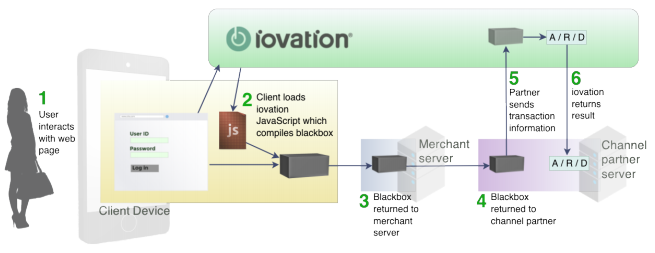
- The merchant's checkout page sends the shopper's device attributes to Iovation, thus creating the black box;
- The merchant receives the encrypted character string from Iovation and writes it on the checkout page in a hidden type field;
- The merchant sends the black box to Cielo, along with the other data of the transaction to be analyzed;
- Cielo receives all the data, validates it, and sends it to ACI Worldwide;
- ACI Worldwide receives all the data and sends the black box to Iovation for decryption;
- ACI Worldwide receives the shopper's device attributes from Iovation.
How to configure it?
- Include Iovation's JavaScript on your checkout page;
- Add configuration parameters to the JavaScript;
- Create a hidden type field on your page to write the black box into and send it along with the data of the transaction to be analyzed.
ImportantDo not cache the script, as this can cause multiple devices to be identified as the same one.
Including Iovation's JavaScript
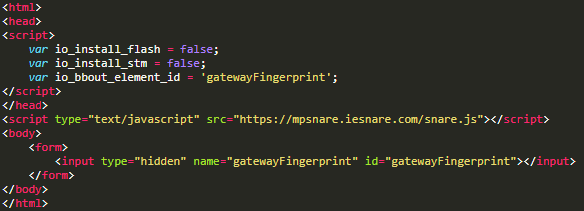
To include the JavaScript, add the following <script> element to your checkout page.
This is the URL for Iovation's snare.js version: <script type=”text/javascript” src=”https://mpsnare.iesnare.com/snare.js”></script>
Configuration parameters
| Parameter | Description | Default |
|---|---|---|
io_install_flash | Determines whether the user will be prompted to install Flash or update the version | false |
io_flash_needs_handler | This parameter is only valid if the io_install_flash parameter is set to TRUE, otherwise it won't be executedYou can customize your own message here in case Flash is not installed Ex.: var io_flash_needs_handler = "Alert('Install Flash');" | N/A |
io_install_stm | Determines whether the user will be prompted to install Active X, which helps collect hardware information This control is only available for Internet Explorer, and if Active X is already installed, this setting will have no effect | false |
io_exclude_stm | Determines whether Active X should run when installed You can choose to disable the control for specific platforms Possible values: 0 - runs on all platforms 1 - does not run on Windows 9.x (including versions 3.1, 95, 98, and ME) 2 - does not run on Windows CE 4 - does not run on Windows XP (including NT, 2000, 2003, and 8 versions) 8 - does not run on Windows Vista Note: The values are a combination of sums of the values above, for example: 12 - does not run on Windows XP (4) or Windows Vista (8) | 15 |
io_bbout_element_id | HTML element Id to fill with the black box If the io_bb_callback parameter is set, this has no effect | N/A |
io_enable_rip | Determines whether it will attempt to collect information to obtain the shopper's real IP address | true |
io_bb_callback | Parameter to customize the check for whether black box collection has been completed When using it, write the function with the following syntax:
| N/A |
WarningThe configuration parameters must be placed before the tag call above; they determine how Iovation's JavaScript will work, and errors may occur if they are placed before the JavaScript call.
Example
Updated 2 months ago
Did this page help you?