

Fraud analysis
The Split de Pagamento integrates with Antifraude to reduce fraud and chargeback risks.
In the Split de Pagamento business model, all chargebacks are passed to the master, who may or may not transfer them to the sellers. Therefore, it is critical that the Antifraude platform is properly integrated and configured.
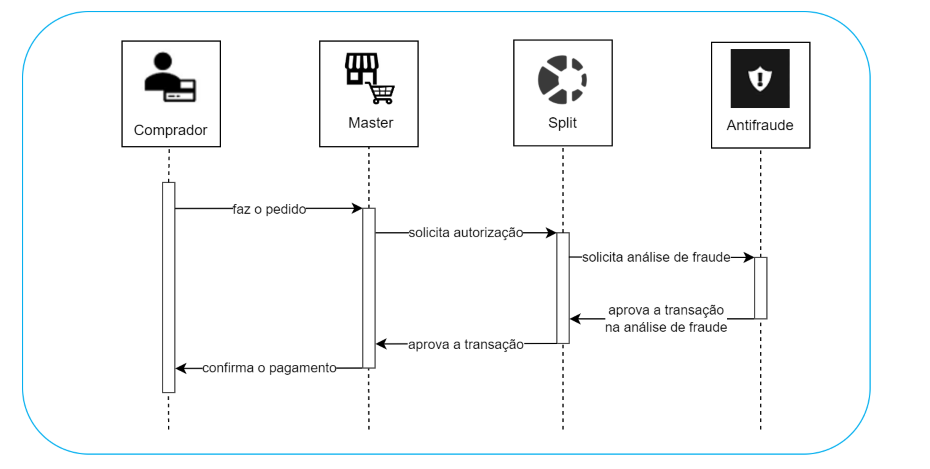
Transaction Flow with Antifraude
The integration with Antifraude is done through the transaction flow itself, in the same request used to create the transaction.
- The shopper places an order with the master.
- The master sends the transaction creation request with the
Payment.FraudAnalysisnode. - Split de Pagamento authorizes the transaction and requests fraud analysis (which can occur before or after authorization).
- Split de Pagamento returns to the master the transaction authorization and the fraud analysis result (which either accepts or rejects the transaction).
- If the transaction is authorized by Split de Pagamento and accepted by the fraud analysis, the master confirms the payment to the shopper.
If the fraud analysis recommends rejecting the transaction, the flow is interrupted.
Split de Pagamento allows submitting the transaction for fraud analysis either before or after the authorization process. This procedure depends on the order set by the master and the chosen criteria.
Examples:
- Fraud analysis before authorization: each transaction is first analyzed by the Antifraude system; then, you can choose to send for authorization only the transactions that Antifraude marks as safe.
- Fraud analysis after authorization: each transaction is first sent for authorization; then, you can choose to submit for fraud analysis only those that were authorized.
| Integration type | Description | Required parameters |
|---|---|---|
| Fraud analysis before authorization | Before the transaction is sent for authorization, Antifraude evaluates whether it is high risk or not. This way, risky transactions are prevented from being sent for authorization. | FraudAnalysis.Sequence = AnalyseFirst |
| Fraud analysis after authorization | The transaction is sent for authorization and only then analyzed by Antifraude. | FraudAnalysis.Sequence = AuthorizeFirst |
| Fraud analysis only if the transaction is authorized | Antifraude will be triggered only to analyze transactions with the status authorized. This flow avoids the cost of fraud analysis for transactions that would not be authorized. | FraudAnalysis.Sequence = AuthorizeFirst and FraudAnalysis.SequenceCriteria = OnSuccess |
| Authorization with automatic capture after fraud analysis | Antifraude will be triggered to perform fraud analysis, and if it recommends accepting the transaction (low risk), authorization with automatic capture will be possible. | FraudAnalysis.Sequence = AnalyseFirst, FraudAnalysis.SequenceCriteria = OnSuccess e Payment.Capture = true |
| Capturar apenas se uma transação for segura | After fraud analysis, capture will be automatic for authorized transactions classified as low risk. For merchants using manual review, the transaction will be captured automatically as soon as Split de Pagamento receives notification of the new status “Accept” (low risk). | FraudAnalysis.Sequence = AuthorizeFirst, FraudAnalysis.CaptureOnLowRisk = true e Payment.Capture = false |
| Cancel a compromised transaction | If the fraud analysis returns high risk for a transaction that has already been authorized or captured, it will be immediately voided or refunded. For merchants using manual review, the transaction will be voided or refunded automatically as soon as Split de Pagamento receives notification of the new status “Reject” (high risk). | FraudAnalysis.Sequence = AuthorizeFirst e FraudAnalysis.VoidOnHighRisk = “true” |
Standard flow
If the desired flow is not specified when creating the transaction, fraud analysis will occur first. If Antifraude recommends accepting it (low risk), the transaction will proceed to authorization. Risk-based capture or void settings will not be enabled.
FraudAnalysis.Sequence= AnalyseFirst;FraudAnalysis.SequenceCriteria= OnSuccess;FraudAnalysis.VoidOnHighRisk= false;FraudAnalysis.CaptureOnLowRisk= false.
To perform fraud analysis during a credit card transaction, you must include the authorization request with the nodes FraudAnalysis, Cart, MerchantDefinedFields, and Travel (only for airline ticket sales).
Updated 6 months ago