

Consulta BIN
For clients using the API Cielo E-commerce solution.
What is Consulta BIN?
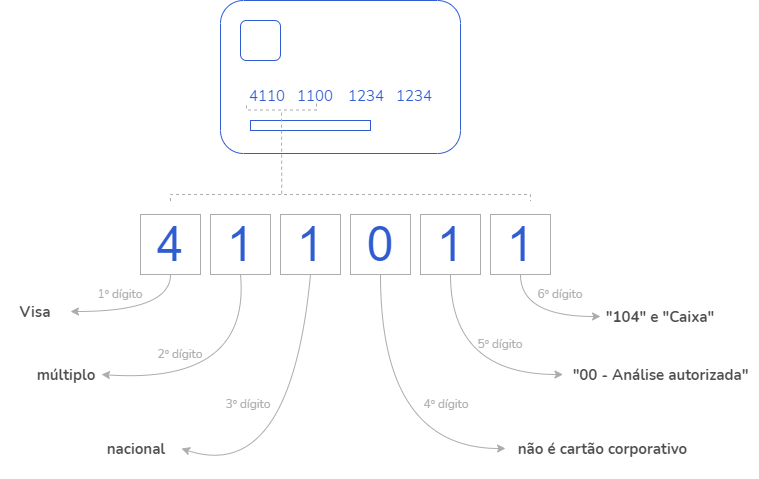
Consulta BIN is a service for card data lookup that identifies credit or debit card characteristics based on the BIN (first 6 digits of the card) and returns information that allows validating the data entered on the payment screen.
- Card brand: name of the brand.
- Card type: credit, debit, or multiple (credit and debit).
- Card nationality: domestic or international.
- Corporate card: whether the card is corporate or not.
- Issuing bank: issuer code and name.
- Prepaid card: whether the card is prepaid or not.
What is the impact on my business?
With the information returned by Consulta BIN, the merchant can take actions such as:
- Offer discounts and promotions for specific cards.
- Make the payment page more modern by automatically identifying the card brand from the BIN entry and avoid errors caused by incorrect brand selection.
- Confirm the card type, for example, identify a pure debit card and notify the cardholder if they try to process a credit transaction.
Advantages: provides data for the merchant to take actions to increase conversion and can be used before authorization.
How to use Consulta BIN?
Based on the result of Consulta BIN, you can develop features in your checkout to improve usability for shoppers, helping recover abandoned carts and increase your store’s conversion rate.
1. Avoid errors related to card brand or card type:
-
The Consulta BIN returns the correct card brand because it is linked to the card brands’ BIN database. This is a much safer method than relying on algorithms in the form.
-
In your store’s checkout, you can create a message to alert the shopper if they are using a debit card when they should be using a credit card.
2. Offer online cart recovery
You can create a flow in your checkout so that if a card entered on the payment screen is multiple (credit and debit), your store can retain the card data and, if the credit transaction fails, automatically offer the shopper a debit transaction with the same card.
3. Alert shoppers about international or prepaid cards
Consulta BIN in the cart can indicate an attempt to use an international or prepaid card. If your store does not accept international or prepaid card payments, you can configure your checkout to inform the shopper that the card entered is not accepted.
What not to do?
Do not perform the query excessively without being linked to a transaction or card storage.
IMPORTANT:
- To enable Consulta BIN, contact the Cielo support team.
- Some BINs or card brands may not return card information.
If the API displays error message 323, it means that Consulta BIN is not enabled. Contact Cielo Support.
Updated 6 months ago