

VerifyCard
VerifyCard consists of two services: Zero Auth and Consulta BIN.
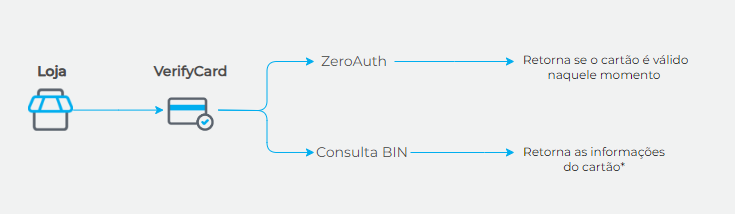
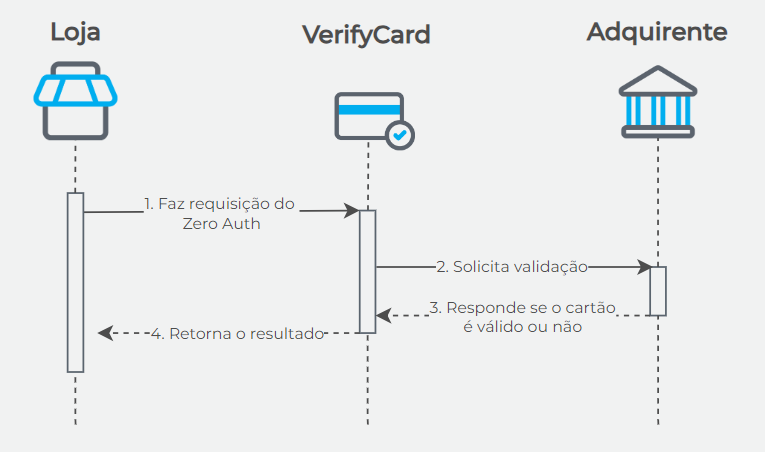
The Zero Auth service identifies whether a card is valid or not through an operation similar to an authorization, but with a value of R$ 0.00.
Zero Auth simulates an authorization without affecting the credit limit or alerting the cardholder about the test.
WarningZero Auth transactions are also subject to the retry program rules defined by the card brands. Excessive attempts may result in fees. Read more at Card Brand Retry Program.
Available card brands per acquirer in Zero Auth:
Cielo: Visa, Master, and Elo;
Getnet: Visa, Master, Elo, and Amex;
Rede: Visa, Master, and Elo.
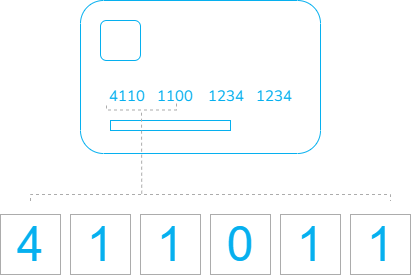
The Consulta BIN service is available exclusively for Cielo clients and returns card information based on the BIN (the first six digits of the card):
- Card brand: name of the brand;
- Card type: credit, debit, or multiple (credit and debit);
- Card nationality: international or domestic;
- Corporate card: whether the card is corporate or not;
- Issuing bank: code and name of the issuer;
- Prepaid card: whether the card is prepaid or not.
Benefits of VerifyCard
The responses from VerifyCard regarding card validity and information allow your store to create customizations in your application and/or checkout. See usage examples:
- Request authorization only if the card is valid: you can create a condition in your application to only send the authorization request if there is a successful response from ZeroAuth;
- Request tokenization only if the card is valid: you can create a condition in your application to request card tokenization only if the card is valid. Learn more in the topic Using VerifyCard with Cartão Protegido;
- Avoid errors related to card type or brand: if your checkout requires manual selection of the card brand or type, you can develop an alert message for cases where, for example, the customer is using a debit card when a credit card is required;
- Offer cart recovery: you can create a flow in your checkout so that, if the card provided is multiple (credit and debit), your store can retain the card data and, if the credit transaction fails, automatically offer the shopper a debit transaction with the same card;
- Alert about international or prepaid cards: if your store does not wish to accept international payments or prepaid cards, for example, you can configure your checkout to inform the customer that the card provided is not accepted.
Environments
| Environment | Transactional Base URL |
|---|---|
| Sandbox | https://apisandbox.braspag.com.br/ |
| Production | https://api.braspag.com.br/ |
For information about testing VerifyCard, see VerifyCard in sandbox.
Updated about 1 month ago