

Handling disputes via API
Split de Pagamento allows the master to receive dispute (chargeback) notifications, query dispute details, and accept or submit a defense for the dispute.
Chargebacks are common in any e-commerce operation and impact the financial schedule. Split de Pagamento provides an easy and simplified way to know when a dispute has occurred and to accept or defend a chargeback.
Check out the benefits of handling disputes through Split de Pagamento:
- The defense period is up to 10 days from the dispute date.
- You can track the entire defense lifecycle: for each update in the analysis stages by the acquirer, card brand, and issuer, Split de Pagamento sends a notification via webhook.
What is a chargeback?
It is the process in which the cardholder disputes a purchase with the card issuer. This dispute can be initiated by the cardholder up to 180 days after the purchase date.
Chargebacks can occur in e-commerce or physical transactions, and the merchant has the right to start the defense of a chargeback in a flow regulated by the card brands.
Check out Cielo's guidelines for Fraud and Chargeback Prevention.
Why does a chargeback occur?
The main reasons for a chargeback are:
- Fraud: the cardholder does not recognize the purchase.
- Commercial dispute: the cardholder recognizes the purchase but claims that some term of the sale was not fulfilled (for example, merchandise not delivered or defective).
- Processing error: the cardholder identifies an error in the charge (duplicate transaction, incorrect amount, payment by other means, etc.).
For transactions authenticated by the 3DS full protocol, liability for fraud-related chargebacks lies with the issuer.
How do I know I received a dispute?
Split de Pagamento will send a JSON notification containing the transaction PaymentId and the ChangeType with the value “7”, which indicates a chargeback occurrence.
{
   "PaymentId": "xxxxxxxx-xxxx-xxxx-xxxx-xxxxxxxxxxxx",
   "ChangeType": "7"
}
To receive the notification, you must have configured the Notification Post.
The notification only informs that there is a dispute for a specific transaction, providing the transaction PaymentId. To know more details such as the amount and the reason for the chargeback, get chargeback details.
After the query, you must decide whether to accept the chargeback or start the defense.
How to get dispute details?
The chargeback query operation allows you to:
- View the chargeback details.
- If the master submits a defense, the query will return the defense lifecycle status.
Check the chargeback query operation via API.
How to accept or dispute a chargeback?
The master can accept or dispute a chargeback for itself or its sellers. Both operations are performed via API:
- Accept a dispute: when the master agrees with a received chargeback, we recommend performing the accept dispute operation.
- Dispute a chargeback: when the master does not agree with a received chargeback and has documents proving that the chargeback did not occur, it is possible to start a dispute defense via API.
Accepting a dispute
When the master agrees with the dispute, we recommend performing the accept dispute operation, which means approving the chargeback debit entry in the schedule.
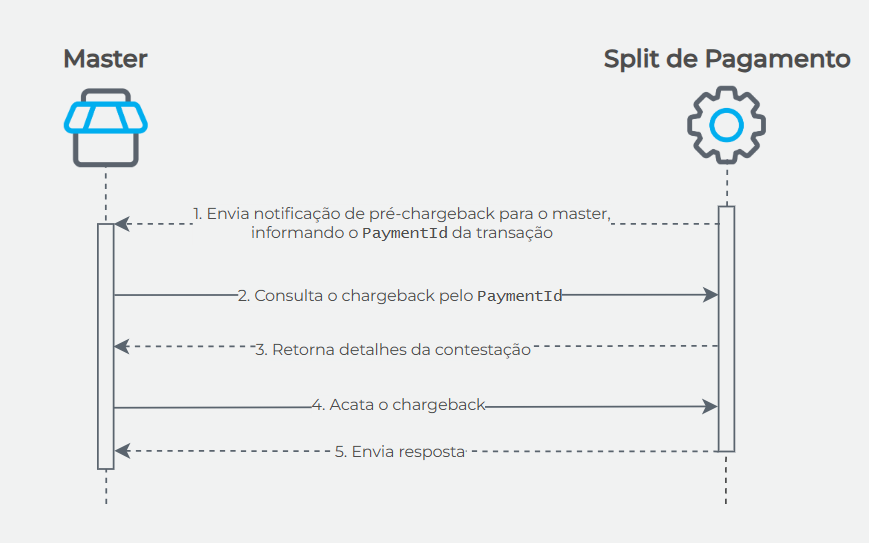
- Split de Pagamento sends a pre-chargeback notification to the master, providing the transaction
PaymentId. - The master queries the chargeback by
PaymentIdvia API. - Split de Pagamento returns the dispute details, such as documents submitted by the shopper and the
DisputeId. - The master performs the accept chargeback operation via API.
- Split de Pagamento returns the status Ok.
Check the Accept chargeback operation via API.
Disputing a chargeback
What is the defense deadline?
The defense period is 10 calendar days from the chargeback notification date.
Which documents should be submitted for the dispute defense?
There is a suggested list of documents based on the dispute reason and business segment. Check the details below:
Document format
Documents must be submitted in a single file with the following specifications:
- File name: the case number. Example: 000001.pdf. Do not add any other words.
- Maximum number of pages: 10.
- Maximum file size: 8MB.
- Allowed formats: PDF, JPEG, and PNG.
Suggested documents
The recommended documents for defense depend on the dispute reason and business segment:
| Chargeback reason | Suggested documents |
|---|---|
| Fraude |
|
| Commercial dispute |
|
| Processing error | In case of a sale processed more than once or payment by other means:
|
Dispute defense flow
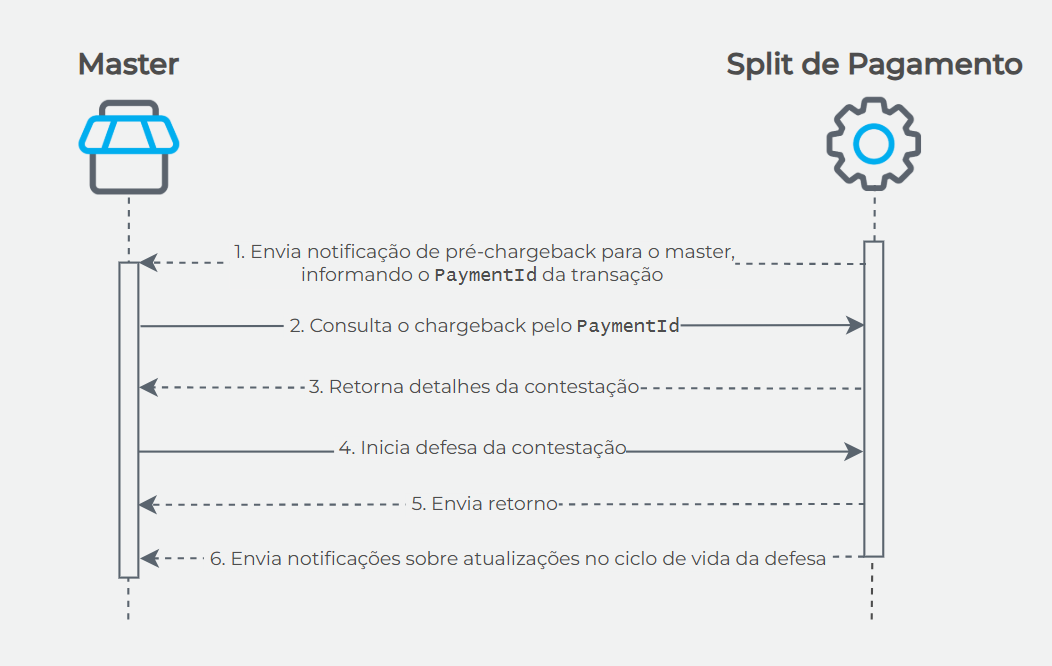
- Split de Pagamento sends a pre-chargeback notification to the master, providing the transaction
PaymentId. - The master queries the chargeback by
PaymentIdvia API. - Split de Pagamento returns the dispute details, such as documents submitted by the shopper and the
DisputeId. - The master performs the operation to start the dispute defense via API, sending the defense documents.
- Split de Pagamento returns the defense initiation status.
- Split de Pagamento will notify updates on the defense lifecycle stages.
For each change in the defense status, Split de Pagamento will send a notification via webhook. The master must query the dispute using the
DisputeId.Check the Start dispute defense operation via API.
API Operations
Check out the links for API operations related to chargeback handling:
| Method | API + Endpoint | Link to API Reference |
|---|---|---|
get | {API Split de Pagamento}/chargeback/dispute | Consult dispute |
put | {API Split de Pagamento}/chargeback/dispute/{DisputeId}/accept | Accept dispute |
put | {API Split de Pagamento}/chargeback/dispute/{DisputeId}/refuse | Start dispute defense |
Updated 6 months ago