

Banco do Brasil
How it works
- After choosing the product in the merchant, the shopper selects the payment method Registered Boleto Banco do Brasil;
- The checkout will display the Boleto URL;
- The client accesses the URL (rendering) and can make the payment.
Attention
- Status reconciliation is not available for Checkout Cielo;
- The merchant must manually reconcile the boleto payment.
Registration and configuration with Banco do Brasil
BB Environment
To enable the Registered Boleto product, contact the Banco do Brasil relationship manager and provide the information below:
| Data | Format |
|---|---|
| URL (site) return to merchant | https://www.pagador.com.br |
| Return file format | (X) CBR643 |
| Return method | (X) Mainframe – for companies with their own system, not using GFN. |
Upon completing the registration, the merchant will receive a document.
2. Obtain credentials on the Banco do Brasil portal
Access the Banco do Brasil portal to obtain your credentials and follow these steps:
• Create registration on BB portal;
• Create an application (Billing API);
• Perform tests and send to production.
3. Register credentials
To use the BancoDoBrasil3 provider, it is mandatory to register the credentials below with Cielo support:
| Field | Value |
|---|---|
| Affiliation Signature | AppKey |
| Username | ClientId |
| Password | ClientSecret |
Boleto configuration at Cielo
Registration data
You must inform Cielo support the following data:
| Data | Description | Format | Notes |
|---|---|---|---|
| Agency | Agency code | 4 digits | Only the four agency numbers are required, without including the check digit. |
| Account | Checking account | 7 digits | Hyphen required. |
| Wallet | Wallet number and variation* The wallet determines the characteristics of the billing service and defines how the boletos will be handled by BB. | 5 digits in the format “XX/XX” | Example: “17/27”. |
| Agreement | E-commerce agreement | 6 digits | It is the same value as Reconciliation (Billing Agreement) provided by the bank. |
| Our Number | Boleto number that allows its identification with BB. It is an incremental counter. | 5 digits | Enter "10000" - With each boleto issued, this number increases by +1. |
| Due Date | Boleto validity period | 2 digits in the format “XX” | It is the default value if no other value is sent via API. |
| Instructions | Information displayed on the boleto | 50 digits | Only numbers and letters A-Z, no special characters or more than one space between each word. |
| AppKey | Affiliation signature provided by Banco do Brasil. Available on the BB portal. | 32 digits | Hexadecimal sequence. |
| ClientId | Identifier at Banco do Brasil | — | Credential provided by Banco do Brasil. |
| ClientSecret | Key at Banco do Brasil | — | Credential provided by Banco do Brasil. |
*Wallet variation for Banco do Brasil: parameter for grouping boletos within the same wallet, allows the merchant to group its boletos according to different business models (branches, points of sale, etc.).
Automatic conciliation of registered boletos
Currently, Banco do Brasil does not provide automatic status updates for registered boletos.
To update the status of paid transactions, perform manual conciliation on the Cielo website.
Confirm Boleto Payment
You can manually confirm the payment of boletos with a Pending status.
- On the Cielo website, go to E-commerce > Link de Pagamento > Pedidos
- Find the desired order;
- Open the transaction details.
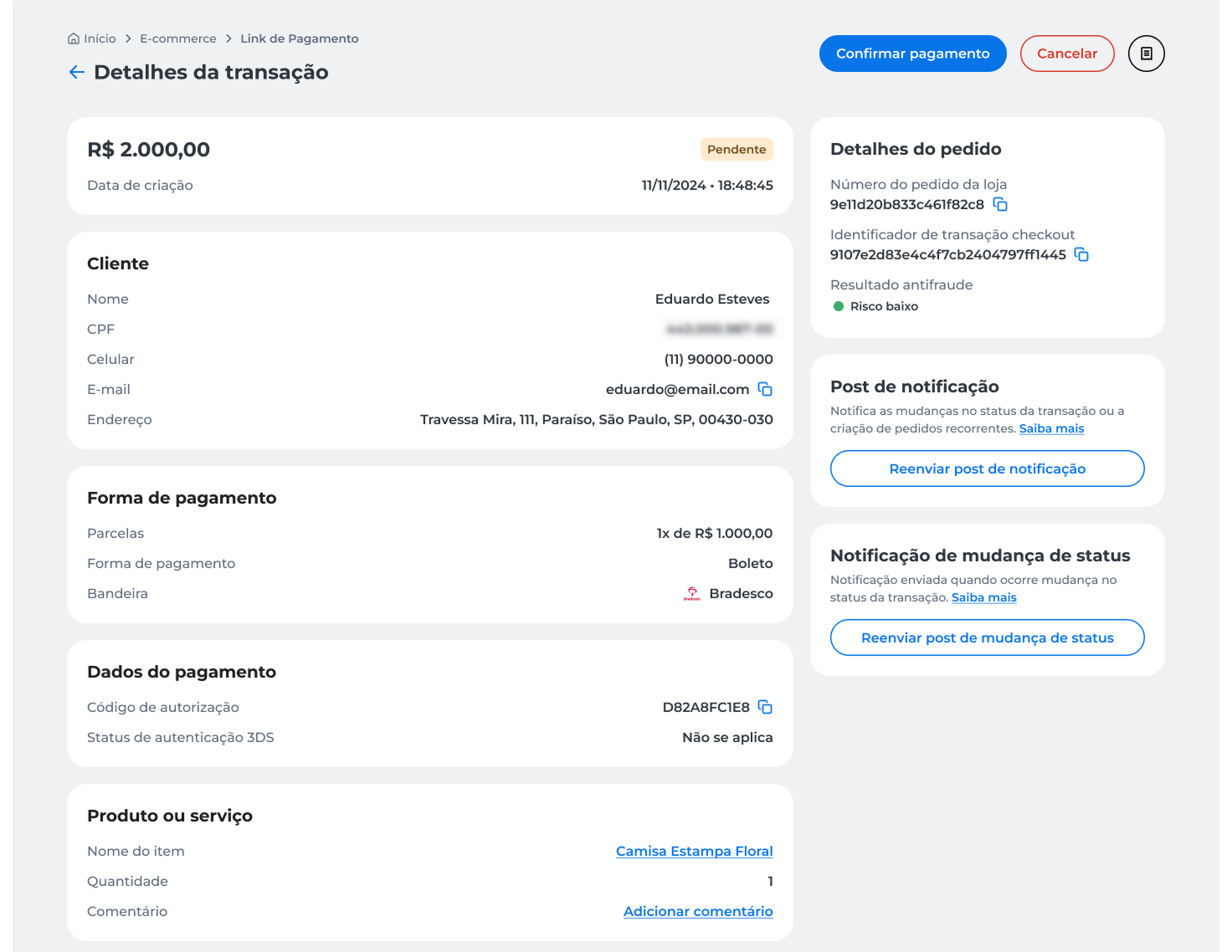
- Click Confirmar pagamento;
- Review the displayed information and click Confirmar.
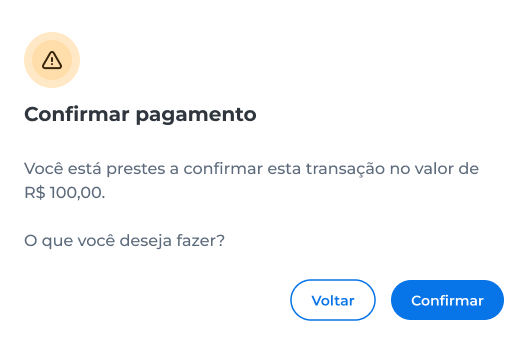
- Enter the security code sent to the registered email;
- Click Validar.
After confirmation, the transaction status will be updated to Pago, and a success message will appear on the screen.
Void Registered Boleto
You can manually void registered boletos with a Pending status.
- On the Cielo website, go to E-commerce > Link de Pagamento > Pedidos;
- Locate the desired order;
- Open the transaction details.
- Click Cancelar;
- Review the displayed information and click Cancelar to confirm the operation.
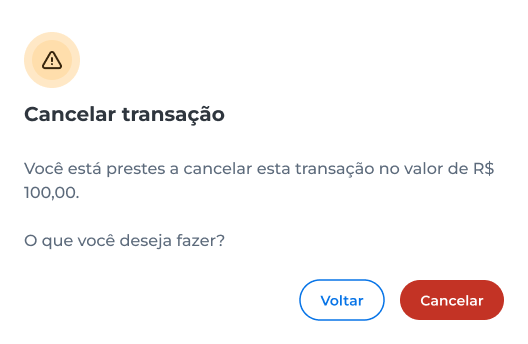
- Enter the security code sent to the registered email;
- Click Validar.
After confirmation, the transaction status will be updated to Voided.
The void process is irreversible.
Updated about 2 months ago