

Technical Implementation of Checkout via iframe
The implementation of Checkout via iframe brings together the necessary steps for the merchant to initiate the payment process, send information to the server, and load the checkout flow directly on the page. This implementation integrates three main parts: front-end, back-end, and the structure of the request sent to the Checkout API.
Back-end
The back-end is the layer that ensures security in creating the checkout. It receives the request sent by the front-end, adds the merchant's credentials, and sends the request to the Checkout API. Then, it returns the checkoutUrl, which will be used to display the payment flow in the iframe.
These responsibilities prevent sensitive data from being exposed in the browser and ensure correct integration.
Why is the back-end necessary?
The back-end acts as a secure proxy. This means it:
- Receives the request from the front-end;
- Adds the necessary credentials;
- Sends the request to the Checkout API;
- Returns only the necessary data to the front-end, such as the
checkoutUrl.
This function avoids the exposure of sensitive information and keeps communication compatible with modern browsers.
Mandatory security rules
- Never expose
MerchantIdorMerchantKeyin JavaScript code; - Use HTTPS/TLS in back-end requests;
- Validate the received request before sending it to the API;
- Avoid logs containing sensitive data;
- Configure a proper timeout;
- Accept only authorized methods and origins in the endpoint;
- Check all possible locations for
checkoutUrlin the response (checkoutUrl, url, etc.).
These rules ensure compliance and prevent security risks.
Implementation example (Node.js)
Below is an example in Node.js showing how the back-end creates the payment page and returns the checkoutUrl. The same structure can be used in other languages.
// server/checkout.js
import express from 'express';
import axios from 'axios';

const router = express.Router();

// Variável de ambiente com o Merchant ID da Cielo
const CIELO_MERCHANT_ID = process.env.CIELO_MERCHANT_ID;

// POST /api/checkout/create
router.post('/checkout/create', async (req, res) => {
    try {
        // Corpo da requisição enviado pelo cliente
        const payload = req.body; // Deve conter OrderNumber, Cart, Payment, Customer, Shipping, Options

        // Chamada à API da Cielo
        const { data } = await axios.post(
            'https://cieloecommerce.cielo.com.br/api/public/v1/orders/',
            payload,
            {
                headers: {
                    'Content-Type': 'application/json',
                    'Accept': 'application/json',
                    'MerchantId': CIELO_MERCHANT_ID
                },
                timeout: 10000 // Timeout de 10 segundos
            }
        );

        // Extrai a URL de checkout retornada pela Cielo
        const checkoutUrl = data?.CheckoutUrl || data?.checkoutUrl || data?.url;
        return res.json({ checkoutUrl });
    } catch (err) {
        return res.status(err.response?.status || 500).json({
            message: 'Falha ao criar checkout',
            detail: err.response?.data || err.message
        });
    }
});
export default router;
Front-end
The front-end is responsible for initiating the checkout creation, sending purchase data to the back-end, and displaying the payment flow inside the iframe. It also manages interface states, such as loading, iframe rendering, and error messages.
Call to the back-end
The front-end application does not communicate directly with the Checkout API. Instead, it makes a request to the store's back-end, which acts as a proxy, adds the credentials, and creates the checkout.
In the example below, the JavaScript service uses the Axios library to send the request to the back-end, but you can use any HTTP library following the same call structure.
// services/CheckoutFetcher.js
import axios from 'axios';

export default {
  async callCreateCheckout(url, payload) {
    const response = await axios.post('/checkout/create', {
      url,
      payload
    });
    return response;
  }
};
The front-end sends only the Checkout API URL and the order request. The back-end is responsible for adding credentials and returning the response with the checkoutUrl.
Component structure and states
The front-end component is composed of three parts:
- Template: contains action buttons, loading messages, the iframe area, and error display;
- Script: manages the component states, makes the call to the back-end, and updates the
checkoutUrl; - Styles: applied in the
<style scoped>block, organize the layout of the checkout, buttons, and interface messages.
The minimum states used in the component are:
loading: indicates that the checkout is being created;checkoutUrl: when filled, triggers the iframe rendering;error: displays messages in case of failure.
An example of defining these states in Vue.js is:
data() {
  return {
    checkoutUrl: '',
    loading: false,
    error: ''
  };
}
Theloading,checkoutUrl, anderrorstates work together in the payment page creation flow.When
loadingis true, the component displays the loading message. WhencheckoutUrlreceives a valid value, the iframe is rendered, and in case of failure, the component fillserrorwith a friendly message and stops loading.To learn how these states behave in error scenarios, see the Error Handling section.
Implementation Examples
Below are two ways to integrate the checkout on the front-end:
- Using a Vue.js component;
- Using HTML and JavaScript without a framework.
<template>
  <div class="checkout-poc">
    <h2>Checkout via iframe</h2>

    <!-- Botões de ação -->
    <button
      v-if="!checkoutUrl && !loading"
      @click="createCheckout"
      class="action-btn">
      Criar Checkout
    </button>

    <button
      v-if="!checkoutUrl && !loading"
      @click="openShortLink"
      class="action-btn">
      Usar Link Encurtado
    </button>

    <!-- Indicador de carregamento -->
    <div v-if="loading">
      <p>Carregando checkout...</p>
    </div>

    <!-- Iframe com o checkout -->
    <div v-if="checkoutUrl">
      <iframe
        :src="checkoutUrl"
        width="100%"
        height="600"
        frameborder="0"
      />
    </div>

    <!-- Mensagem de erro -->
    <div v-if="error" class="error">
      {{ error }}
    </div>
  </div>
</template>

<script>
import CheckoutFetcher from '@/services/CheckoutFetcher';

export default {
  name: 'CheckoutIframe',
  data() {
    return {
      checkoutUrl: '',
      loading: false,
      error: ''
    };
  },
  methods: {
    // Opção 1: Usar link encurtado direto
    openShortLink() {
      this.checkoutUrl = 'https://cielolink.com.br/SEU_LINK_AQUI';
    },

    // Opção 2: Criar checkout via API
    async createCheckout() {
      this.loading = true;
      this.error = '';

      // URL da API Cielo
      const apiUrl = 'https://cieloecommerce.cielo.com.br/api/public/v1/orders';

      // Dados do pedido
      const payload = {
        OrderNumber: 'Pedido0123',
        SoftDescriptor: 'Nomefantasia',
        Cart: {
          Items: [
            {
              Name: 'Produto01',
              Description: 'ProdutoExemplo01',
              UnitPrice: 100,
              Quantity: 1,
              Type: 'Asset',
              Sku: 'ABC001',
              Weight: 500
            }
          ]
        },
        Payment: {
          BoletoDiscount: 15,
          MaxNumberOfInstallments: 12
        },
        Customer: {
          Identity: '45873281890',
          FullName: 'João da Silva',
          Email: '[email protected]',
          Phone: '11988776655'
        },
        Shipping: {
          SourceZipCode: '20020080',
          TargetZipCode: '21911130',
          Type: 'FixedAmount',
          Address: {
            Street: 'Alameda Xingu',
            Number: '512',
            Complement: '21 andar',
            District: 'Alphaville',
            City: 'Barueri',
            State: 'SP'
          },
          Services: [
            {
              Name: 'Entrega Express',
              Price: 1000,
              Deadline: 2
            }
          ]
        }
      };

      try {
        // Chama o backend que faz proxy para Cielo
        const data = await CheckoutFetcher.callCreateCheckout(apiUrl, payload);

        // Extrai a checkoutUrl da resposta
        // A URL pode estar em diferentes lugares dependendo da versão da API
        let checkoutUrl = '';
        if (data?.data?.settings?.checkoutUrl) {
          checkoutUrl = data.data.settings.checkoutUrl;
        } else if (data?.data?.checkoutUrl) {
          checkoutUrl = data.data.checkoutUrl;
        } else if (data?.data?.url) {
          checkoutUrl = data.data.url;
        }

        this.checkoutUrl = checkoutUrl;

        if (!this.checkoutUrl) {
          this.error = 'URL de checkout não encontrada na resposta.';
        }
      } catch (e) {
        this.error = 'Erro ao criar checkout.';
        console.error(e);
      } finally {
        this.loading = false;
      }
    }
  }
};
</script>

<style scoped>
h2 {
  font-size: 1.25rem;
  font-weight: 700;
  color: #2F363E;
}

.checkout-poc {
  max-width: 600px;
  margin: 40px auto;
  padding: 24px;
  background: #fff;
  border-radius: 8px;
  box-shadow: 0 2px 8px rgba(0, 0, 0, 0.08);
}

button {
  padding: 10px 24px;
  font-size: 16px;
  background: #1976d2;
  color: #fff;
  border: none;
  border-radius: 4px;
  cursor: pointer;
}

.action-btn {
  margin-right: 16px;
}

.error {
  color: #d32f2f;
  margin-top: 16px;
}
</style>
<!-- Container acessível para o checkout embutido -->
<section class="checkout-embed" aria-label="Pagamento seguro">
<div id="checkout-wrapper">
<iframe
id="cielo-checkout"
title="Finalização de pagamento"
allowpaymentrequest
allow="payment *; clipboard-write"
style="width:100%; min-height:640px; border:0; background:#fff; border-radius:12px; box-shadow:0 8px 24px rgba(0,0,0,.12);"
referrerpolicy="no-referrer"
sandbox="allow-scripts allow-same-origin allow-forms"
src=""
<!-- preenchido via JS -->
></iframe>
</div>
<div id="checkout-loading" role="status">Carregando o checkout…</div>
<div id="checkout-fallback" hidden>
Não foi possível carregar o checkout embutido.
<a id="checkout-direct-link" rel="noopener">Abrir pagamento</a>.
</div>
</section>
<script>
// Mock: usar sempre o mesmo link encurtado (fixo) no protótipo
const CHECKOUT_URL = 'https://pay.exemplo/abc123';
const iframe = document.getElementById('cielo-checkout');
const loadingEl = document.getElementById('checkout-loading');
const fallbackEl = document.getElementById('checkout-fallback');
const directLink = document.getElementById('checkout-direct-link');
function loadCheckout(url) {
// Link direto para fallback manual
directLink.href = url;
// Define a URL no iframe
iframe.src = url;
// Estado de carregamento simples (sem depender de mensagens do destino)
let finished = false;
const FAIL_TIMEOUT_MS = 7000; // ajuste conforme sua UX
// Se o documento do iframe carregar, ocultamos o loading
iframe.addEventListener('load', () => {
finished = true;
loadingEl.hidden = true;
// (Opcional) Ajustes de layout adicionais podem ser aplicados aqui
}, { once: true });
// Fallback por timeout: se não carregou em N segundos, exibe alternativa
setTimeout(() => {
if (!finished) {
loadingEl.hidden = true;
fallbackEl.hidden = false;
}
}, FAIL_TIMEOUT_MS);
}
loadCheckout(CHECKOUT_URL);
</script>The HTML + JavaScript example shows how to load the iframe directly, display a loading indicator, and provide a fallback with a direct link if loading is not completed within a defined time.
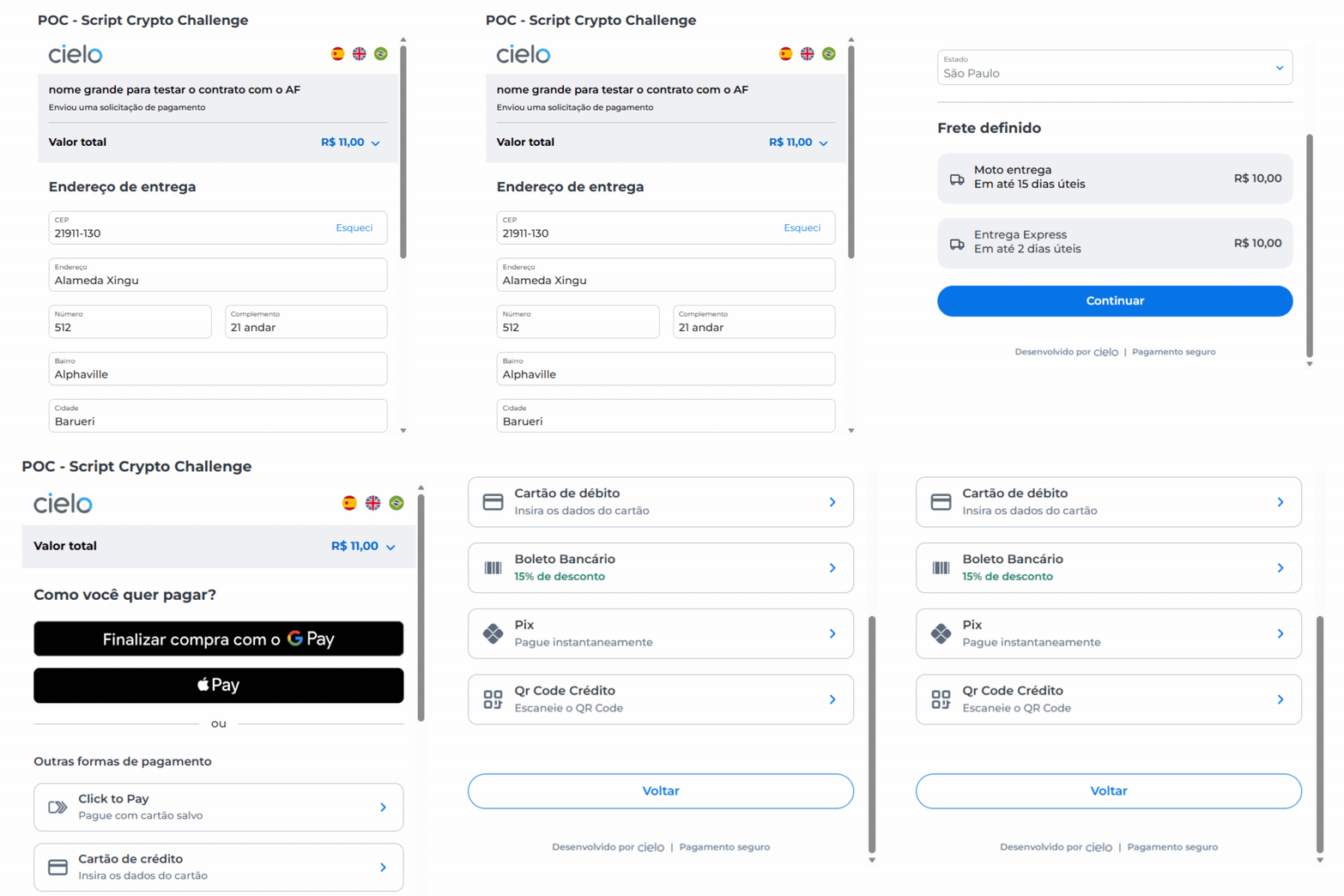
Visual example of the checkout displayed in the iframe
The image below shows how the checkout is displayed in the iframe after creating the payment page. This example is based on the POC used during testing and aims to illustrate the shopper's final experience.
Request Structure
Creating the payment page requires sending a request to the Checkout API. This request contains order data, shopper details, and payment conditions. The request must be sent by the store's back-end to the endpoint:
POST https://cieloecommerce.cielo.com.br/api/public/v1/orders
The complete list of fields, accepted formats, and request examples is available in the API reference at Create Checkout Cielo Payment Page.
Updated 4 months ago