

Checkout via iframe Architecture
The Checkout via iframe architecture is composed of three main layers: front-end, back-end, and Checkout API. Each layer performs a fundamental step to create the checkout, generate the checkoutUrl, and display the payment flow inside the iframe.
A key point of the architecture is that the front-end does not communicate directly with the Checkout API. All communication with the API occurs exclusively through the back-end, ensuring security, standardization, and protection of credentials.
Architecture Components
1. Front-end (store)
The front-end is responsible for:
- Initiating the creation of the payment page;
- Sending a request to the back-end without including credentials;
- Receiving the
checkoutUrl; - Rendering the iframe with the checkout;
- Managing loading states, errors, and fallback.
2. Back-end (store server)
The back-end acts as an intermediary between the store and the Checkout API. It:
- Receives the request sent by the front-end;
- Adds the
MerchantIdcredential; - Creates the payment page in the Checkout API via the
POST /api/public/v1/ordersendpoint; - Returns the final URL to the front-end.
For more details and complete examples, see Create Checkout Cielo Payment Page.
3. Checkout API
The Checkout API is responsible for:
- Receiving the request sent by the back-end;
- Processing the order data;
- Creating the payment page;
- Returning the
checkoutUrl, used by the iframe.
Complete Checkout via iframe Flow
The complete flow describes the journey from the user's action to the checkout display:
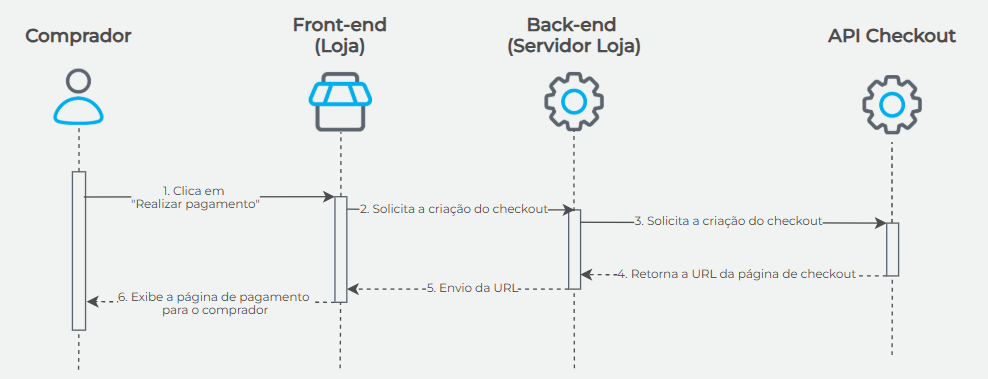
The following step-by-step describes the complete journey of creating and displaying the checkout:
- The shopper clicks "Make Payment";
- The front-end sends a request to the back-end requesting the creation of the payment page;
- The back-end sends a request to the Checkout API
(POST https://cieloecommerce.cielo.com.br/api/public/v1/orders); - The Checkout API creates the payment page and returns the
checkoutUrl; - The back-end sends the
checkoutUrlback to the front-end; - The front-end displays the payment page in the shopper's session.
Updated 4 months ago