
Voucher
Please refer to the API Reference for the full request and response examples.
See below the representation of a standard transactional flow when creating a Voucher transaction:
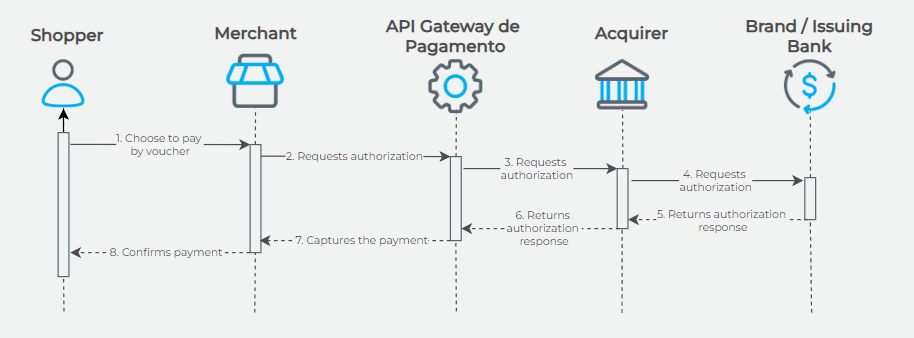
A transaction with a voucher card is similar to a debit card transaction; only without the authentication process.
Currently, Alelo and Ticket providers are supported.
Alelo
- Automatic capture when
PaymentCapture= true or not informed; - Does not allow posterior capture;
- Allow total canceling.
Ticket
- Automatic capture when
PaymentCapture= true or posterior capture (pre-authorization) whenPaymentCapture= false; - Allows total and partial canceling/refund.
ImportantWhen performing pre-authorization for voucher Ticket, the API will return
PaymentStatus= 1 and will not return parametersPayment.CapturedAmountandPayment.PaidDate.
Ticket Payment Method Setup
To activate the Ticket payment method, follow these steps:
- The merchant must contact Ticket and request the release of e-commerce integration.
- The merchant must open a support ticket requesting activation of the payment method and provide the information registered with Ticket:
- CNPJ;
- Corresponding MCC;
- Support will proceed with the activation of the payment method.