
How to Enable Pix
Pix can be enabled quickly and securely via the Site Cielo or the App Cielo Gestão. See below how to activate the available options:
Pix Cielo
Pix Cielo is enabled simply on the website or app. This option allows you to receive payments via Pix generated by Cielo.
ImportantActivation is required to process Pix transactions. The selected payment method will apply to all merchant locations (ECs) under the same CNPJ.
Sandbox
- Pix is enabled by default;
- To generate a Pix QR Code in the sandbox, just fill in the required fields;
- The payment status remains "12" (pending) and cannot be changed to paid.
How to activate Pix Cielo
- Log in to the Site Cielo;
- In the menu, select:
My Registration → Authorizations → Pix.
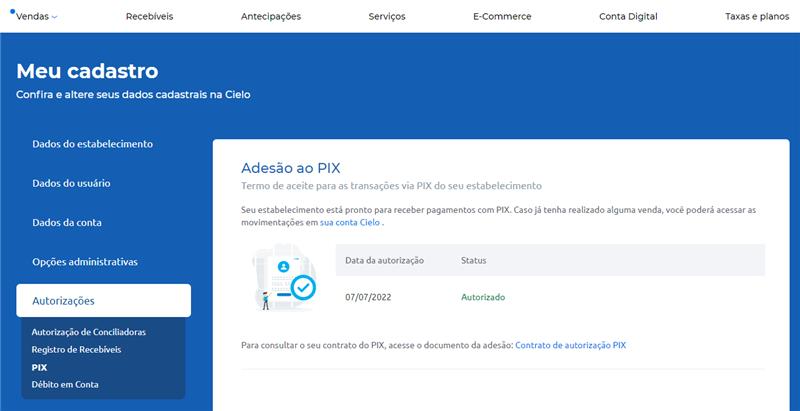
- Accept the Terms of Adhesion:
- Read the contract;
- Check the “Contrato de autorização Pix" option;
- Click Enviar to finish.
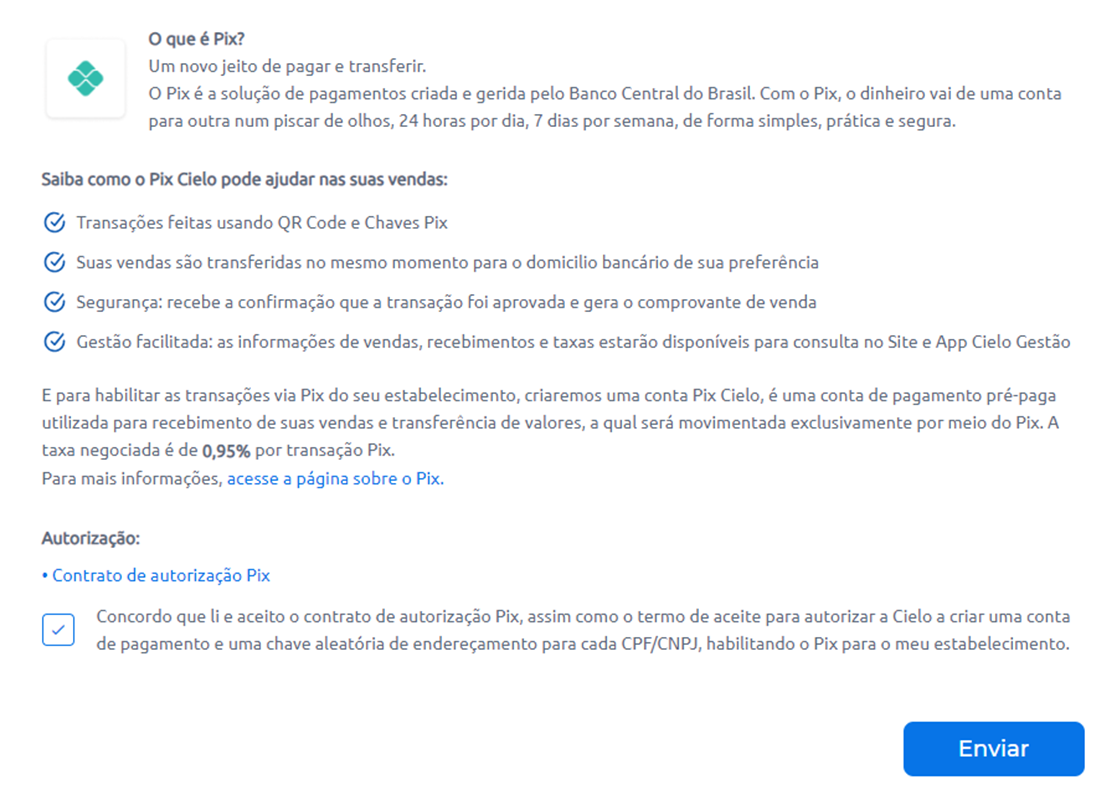
After sending:
- You will see the message "Sua autorização do Pix foi enviada com sucesso";
- Confirmation will be sent by email or SMS.
Pix Banco do Brasil
Pix Banco do Brasil must be enabled to receive transactions via the API E-commerce Cielo.
WarningEven if multiple Pix modalities are contracted, only one can remain active at a time. All transactions automatically use the active modality at the time of payment.
Prerequisites
To enable Pix Banco do Brasil, you will need:
- A store registered and active with Cielo;
- Valid credentials for the API E-commerce Cielo;
- Pix Banco do Brasil modality contracted for the store's CNPJ;
- Access to the Site Cielo.
1. Enable Pix in the store registration
- Access the Site Cielo;
- Go to Meu Cadastro → Autorizações → Pix.
If Pix is not available for activation, contact Cielo Customer Service to request enablement.
2. Select Pix Banco do Brasil as the active modality
- In the Configurações do Pix tab, view the contracted modalities;
- Select Pix Banco do Brasil as active;
- Click Confirm.
ImportantThe change is not immediate. The new modality becomes active starting at 12:00 AM the following day. Until then, transactions will continue using the current active modality.
3. Create Pix transactions with QR code
After activating the modality:
- Send transactions through the Cielo E-commerce API using:
- Payment method Pix;
- Do not include the provider (the API automatically uses the active modality).
See the sample request and response at: [Create Pix QR Code Payment]
Pix modality change
Pix modality is the Pix processing method associated with your registration at Cielo. The available modalities are:
- Pix Cielo: direct processing by Cielo;
- Pix Banco do Brasil: processing by Banco do Brasil using the API E-commerce Cielo.
How to change the active modality
- Access the Pix Settings area on the Site Cielo;
- Select the desired modality (Pix Cielo or Pix Banco do Brasil);
- Confirm the scheduling of the change.
Warning
- Only one Pix modality can remain active at a time for the entire CNPJ;
- The change is not immediate. The new modality becomes valid starting at 0h the next day. Until then, transactions continue using the previous modality.
Updated about 2 months ago