
Manage Users
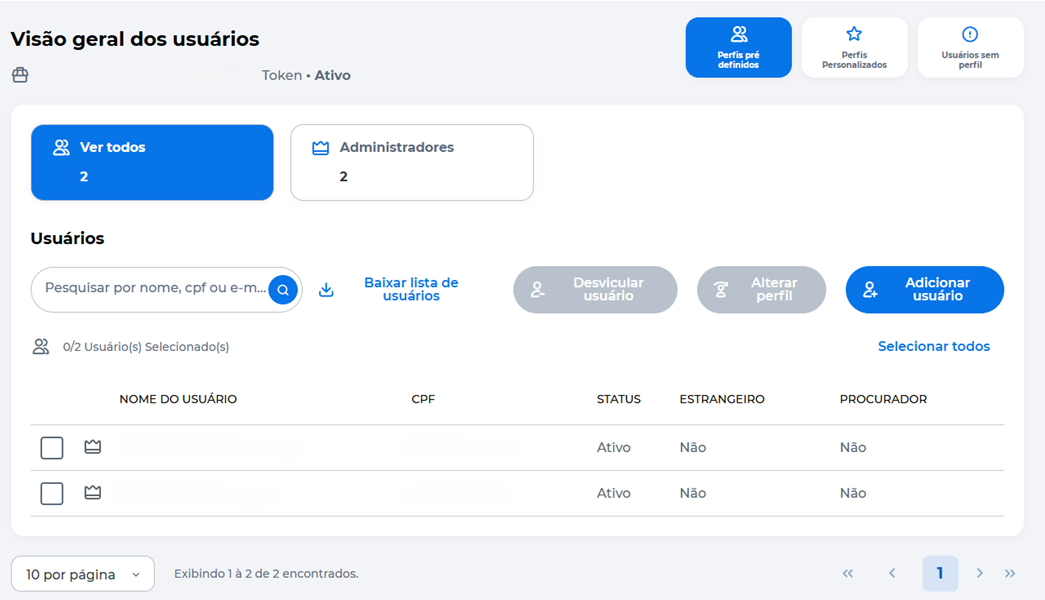
The Manage Users feature allows you to view, search, and manage the access of users linked to the merchant.
How to Access
In the Sua equipe section, click Gerenciar usuários.
User Overview
On the management screen, you can:
- View all registered users;
- Filter by profile (e.g., Administrators);
- Search by name, CPF, or email;
- Select users to apply actions;
- Access other management features.
You can also:
- Download the user list;
- Unlink users;
- Change the profile;
- Add new users;
- Select all users to perform actions in bulk.
Unlink User
Use this option to remove a user's access to the merchant.
- On the Gerenciar usuários screen, select one or more users;
- Click Desvincular usuário;
- Review the confirmation message;
- Click Confirmar;
- Enter the security token when prompted.
Important
- After confirmation, the user will lose access to the merchant and the assigned permissions;
- It is not possible to unlink the merchant's owner user;
When the operation is completed, the system displays the message User Unlinked.
Change Profile
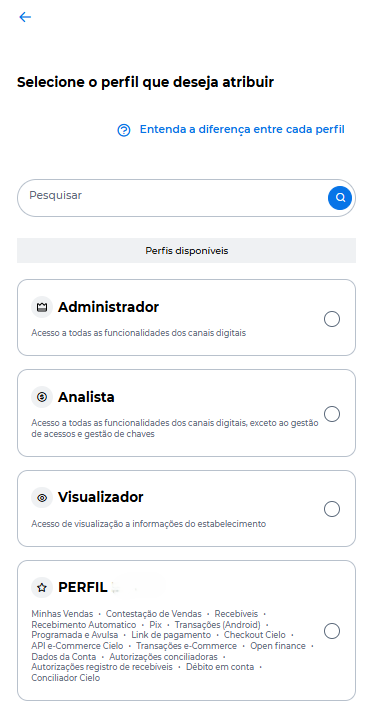
Use this option to change a user's access profile.
- On the Gerenciar usuários screen, select one or more users;
- Click Alterar perfil;
- Select the desired profile;
- Click Confirmar;
- Enter the security token generated in the Cielo Gestão App.
After confirmation, the profile is updated and the permissions will reflect the newly assigned profile.
WarningTo complete the change, the security token must be active in the Cielo Gestão App.
Updated about 10 hours ago